
Two weeks ago we connected Power BI to Arc through Microsoft Fabric: a Python notebook pulls a window of data from Arc as Arrow, writes it to a Lakehouse table, and a schedule keeps it fresh. It works with any Arc since 25.12.1, and people can use it today.
It is also a copy, and copies have a cost. The data now lives in two places. The report is only as fresh as the last run. Every run moves the whole window through the notebook's memory, so you pull thirty days rather than seven years. And there is a schedule to own, with failure emails when it breaks.
What bothered us most is that Arc already stores everything as Parquet, in a bucket, in an open format Fabric understands. Arc can already describe those files as Apache Iceberg tables. So why was a notebook copying them from one bucket into another?
At the end of that post we said the next release would make the path shorter. This is that path. With Arc 27.01.1 on S3 storage, Fabric reads Arc's own Parquet files where they are. There is no notebook, nothing is copied, and there is nothing to schedule. Arc keeps writing to its bucket, and the Power BI report reads from the same files.
It did not work the first time. Why it failed is the interesting part, and fixing it changed Arc.
How it works
Arc  ──Parquet + Iceberg metadata──▶  S3 bucket  ◀──shortcut──  Lakehouse table  ──▶  Power BI report
                                                     (OneLake)                         (Direct Lake on SQL)
Arc has exported its data as Apache Iceberg tables since 26.09.1. Arc doesn't rewrite anything for the export: it writes Iceberg metadata (snapshots and manifests) that describe the Parquet files Arc already has, and updates it as data arrives, compacts or expires.
Fabric can put an Iceberg table into a Lakehouse through a OneLake shortcut. You point the shortcut at the table's folder in S3, OneLake converts the Iceberg metadata to Delta, and Fabric's SQL endpoint, Spark and Power BI all see an ordinary Lakehouse table. The data stays in your bucket.
The first attempt
We exported energy_grid.fuel_daily to a test bucket: US electricity generation by fuel, 14 regions, one row per region per day from January 2019 to July 2026. That's 38,360 rows in 2,740 Parquet files. Then we created the shortcut.
It half-worked, which made it confusing. OneLake converted the table without complaint. The Lakehouse showed fuel_daily with every column and the right types. Then the first query that touched the data failed with FAILED_READ_FILE.
Fabric had read the table's metadata fine and then could not open a single Parquet file. The metadata and the data were in the same bucket, behind the same key, so it wasn't access. So we looked at which paths Fabric was trying to read, and how they related to where the shortcut pointed.
The cause was where Arc put the metadata. By default the export keeps Iceberg metadata in a warehouse directory, separate from the data:
s3://bucket/arc_energy_grid.db/fuel_daily/metadata/...      ← Iceberg metadata
s3://bucket/energy_grid/fuel_daily/2024/05/22/00/...parquet ← Arc's data
The manifests point at the data files by absolute path, which is fine for DuckDB, Spark or PyIceberg reading the table directly: they follow the path wherever it goes. A OneLake shortcut works differently. It mounts one folder into the Lakehouse, and everything the table needs has to be inside that folder. Arc's metadata was inside the shortcut, and the data it pointed to was one directory over.
Nothing was wrong with the Iceberg table. It was valid, and every other engine we had tested read it. It just assumed a reader that can follow a path anywhere in the bucket, and a shortcut can't.
Proving it before changing anything
Before touching Arc, we wanted to know the theory was right. We built the same table by hand with PyIceberg, over the same Parquet files Arc had written, with one difference: the table's location was the measurement's own folder, so the metadata sat inside it, next to the year directories.
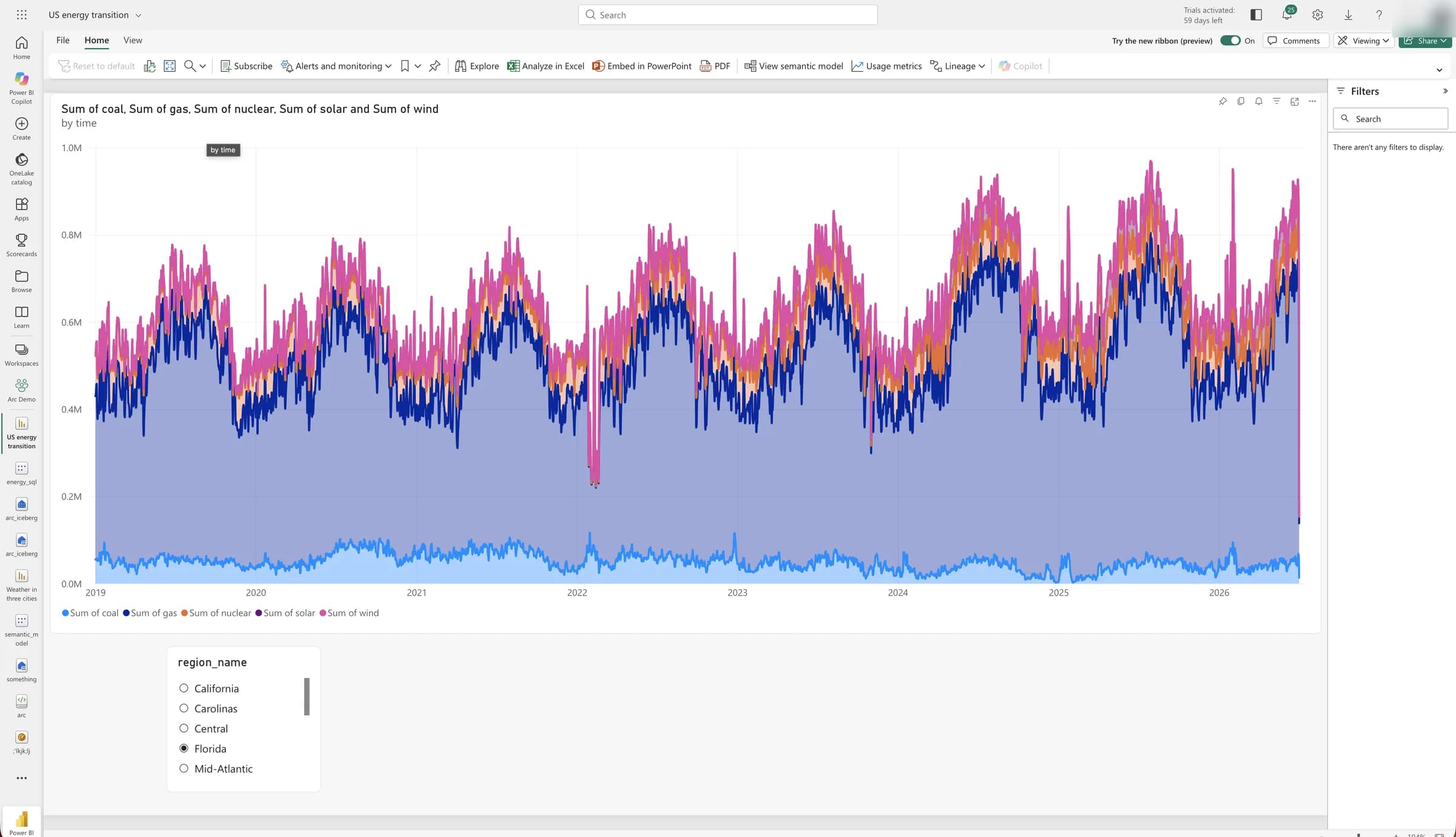
We pointed a new shortcut at that folder. The preview loaded, the SQL endpoint's SELECT COUNT(*) returned 38,360, exactly Arc's count, and a Power BI report on seven years of daily generation drew without complaint. Same files, same bucket, different metadata location. That was the whole difference.
The fix: a colocated layout
Arc 27.01.1 adds one setting:
[iceberg]
enabled = true
layout  = "colocated"
With it, a table's location is the measurement's own directory, and its metadata goes beside the data:
s3://bucket/energy_grid/fuel_daily/metadata/...              ← Iceberg metadata
s3://bucket/energy_grid/fuel_daily/2024/05/22/00/...parquet  ← Arc's data
Every file the table references is now under one folder, and that folder is what the shortcut points at.
Databricks, reading Arc's tables through AWS Glue, needs the same layout for the same reason. That's Monday's post.
We kept the old layout as the default. It works for every engine that reads a table directly, it allows a warehouse outside the storage root, and changing the default would move the metadata of every existing deployment under its users' feet. Existing tables keep their location whatever the setting says. Moving one is a deliberate step, and the docs have it.
What changed inside Arc
Putting the metadata in the measurement's folder sounds like a one-line change: tell Iceberg a different location. Most of the work was elsewhere, because Arc's data tree now holds something that isn't Arc's data:
- Arc must not read the metadata as data. Query pruning and the schema registry walk a measurement's directory and expect only the hour folders. Both now set
metadata/aside. - Deleting a database has to stay safe. A database
DELETEremoves everything under the database's directory, and that now includes table metadata. In a cluster, another node may still hold a catalog entry for that table, so Arc writes the drop markers first and removes the metadata after. Otherwise that node would find its table gone with no record of why. - A node must not create the same table twice. A node that has no catalog entry for a table looks for published metadata under both layouts before creating anything, so switching the setting never forks a table into two.
- Restored metadata must point home. Iceberg metadata records the table's absolute location. If you restore a backup into another bucket or prefix, the copied metadata still names the old one, and the next commit would write there. Arc refuses to adopt it, logs which directory to delete, and recreates the table.
None of that shows up in Fabric. It's what makes the setting safe to turn on in an Arc that is already running.
The second attempt
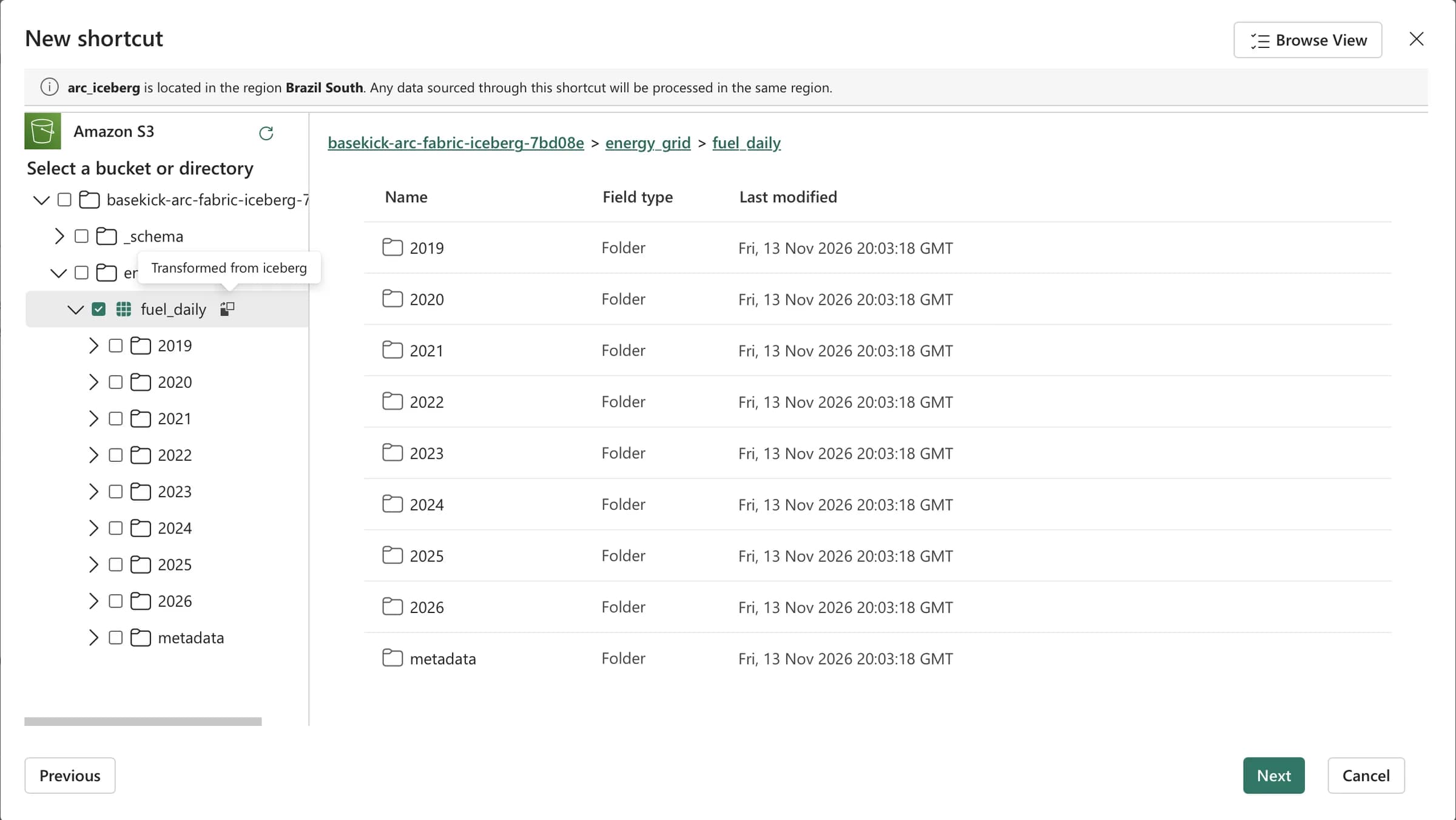
Same bucket, same data, this time with Arc's own export and the new setting. In the Lakehouse: New shortcut → Amazon S3, a connection with a read-only key, and the measurement's folder ticked. Fabric marked the table as transformed from Iceberg, the preview loaded in about eleven seconds, and the report we had built during the hand-built check worked unchanged on Arc's table.
Here is Arc's own measurement folder in the shortcut dialog: the year folders Arc writes, the metadata/ folder beside them, and Fabric's tooltip on the table:
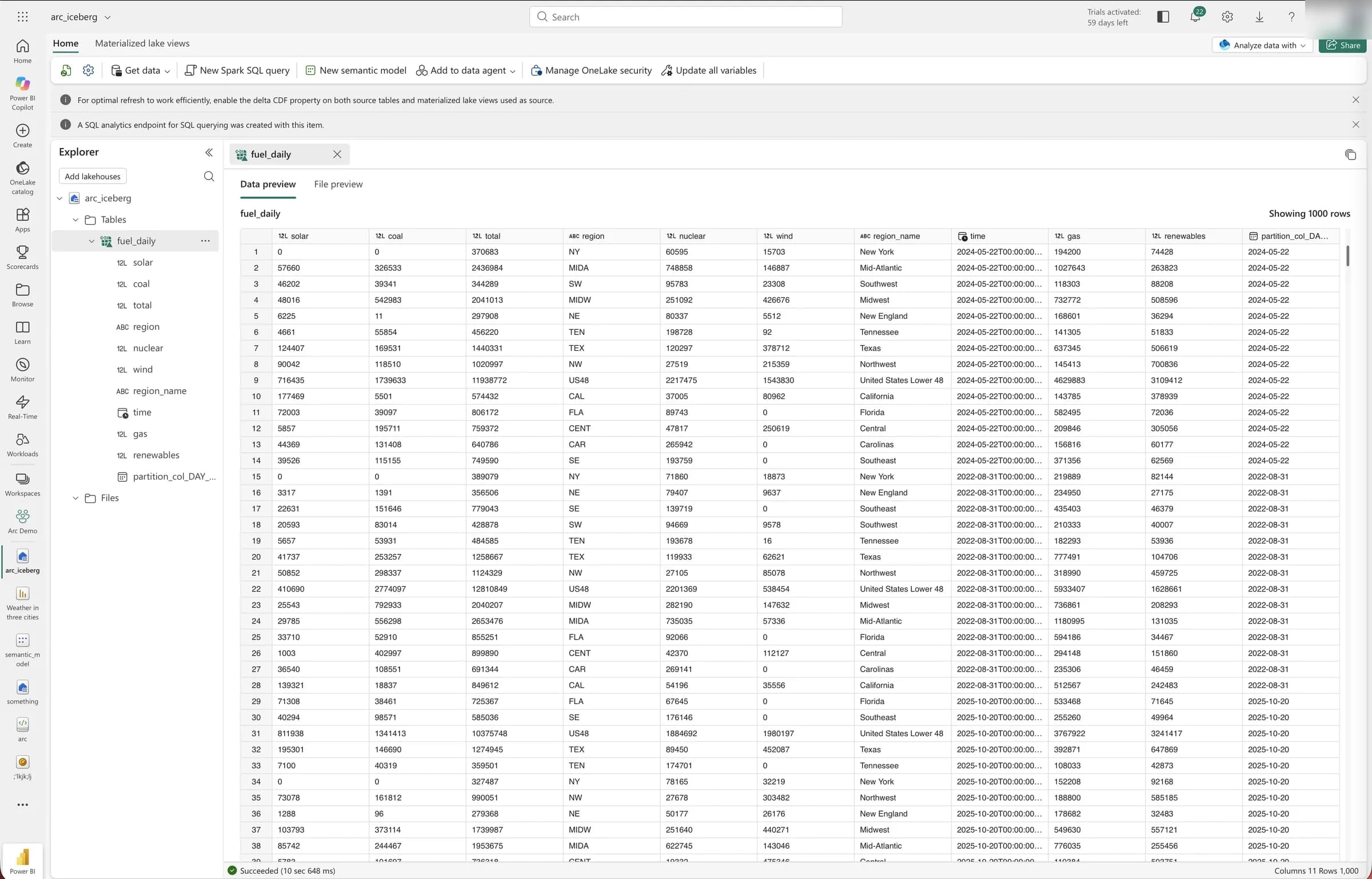
The preview and report below were captured during the hand-built check; the table is the same folder over the same files. The preview reads straight from the Parquet files in S3:
From there it's the usual Fabric flow: a semantic model, then a report.
The surprise on the Power BI side
The table read fine. The first semantic model did not.
When you create a semantic model, Fabric offers two storage modes: Direct Lake on OneLake and Direct Lake on SQL. We picked OneLake first, since it sounded like the most direct. The model refused to load.
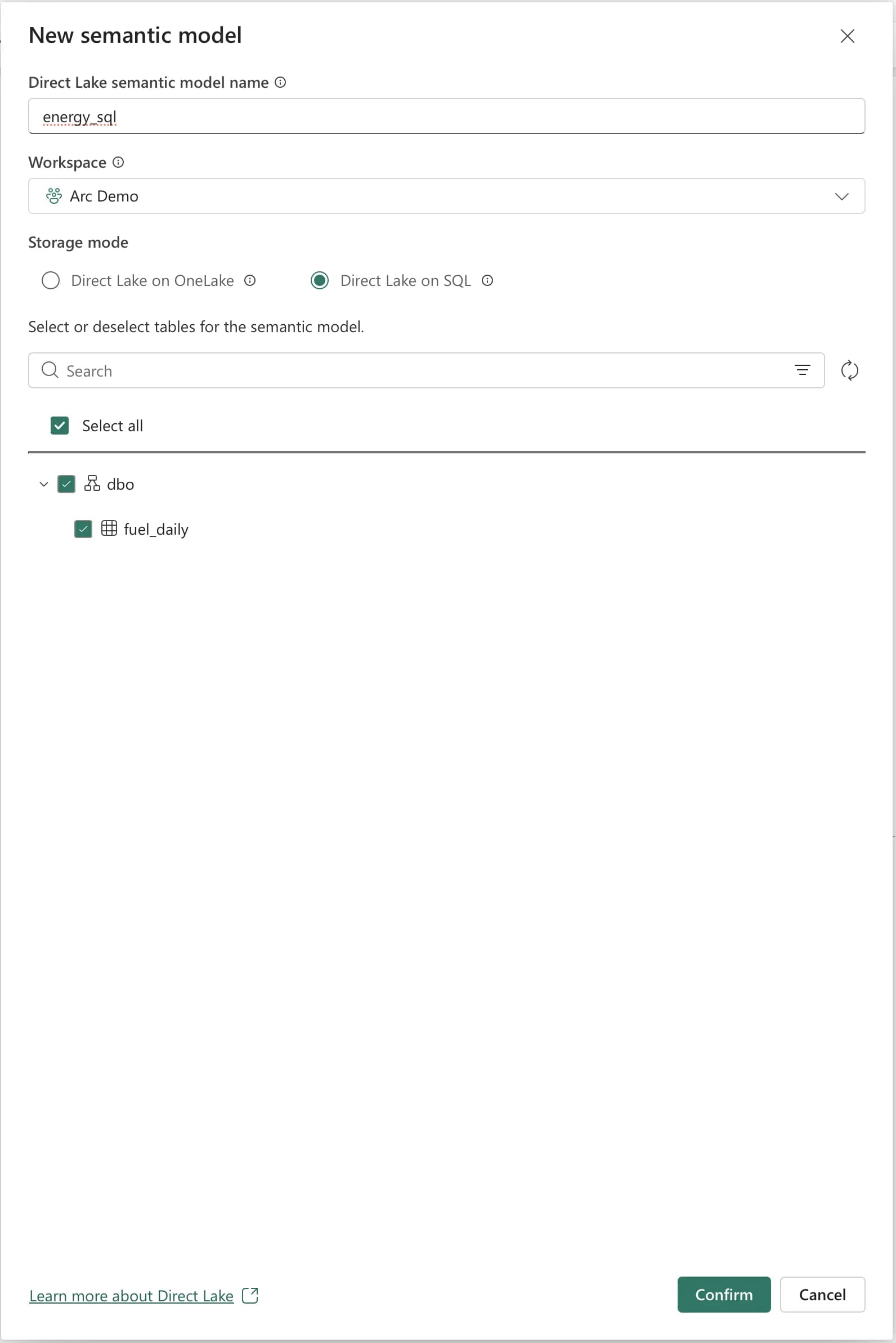
Direct Lake limits how many files a table can have, and the limit depends on the capacity. Arc writes at least one file for every hour that has data, and compaction merges them into one per day, so seven years of history is thousands of files. Our 2,740-file table went over the limit on a trial capacity. Direct Lake on OneLake has no fallback when that happens: the model just doesn't load.
Direct Lake on SQL has the same limit, but when a table goes over it, it falls back to DirectQuery and keeps working. We recreated the model with SQL and the report worked. Pick SQL for Arc tables with long histories.
And one on our side
Our test setup had a quirk of its own. Arc ran on a laptop in Costa Rica, writing to a bucket in São Paulo, next to the Fabric capacity. The first time Arc exports a measurement, it registers every existing file in a single commit. Over that link, for 2,740 files, the commit couldn't finish within Arc's per-measurement time limit, so every pass started over.
On a server in the same region as its bucket this doesn't happen. But it is a real limit, and an all-or-nothing first pass is the wrong design for big measurements on slow links. We're changing it to commit in batches.
What to watch for
- Never run orphan-file cleanup on these tables. The table's folder is Arc's data folder.
remove_orphan_files, from a Fabric notebook or any other engine, deletes every file there that no snapshot references, including data Arc wrote since its last export pass. - Cold tier. On Arc Enterprise with tiered storage, files that move to the cold tier leave the table's folder, and the shortcut can't follow them. For now, report on hot data, or use the notebook route for the history. We're working on it: a migrated file keeps its path on the cold tier, so the cold side already has the shape of a table folder.
- Freshness. Arc publishes a new snapshot on each export pass that finds changed files (every five minutes by default), and OneLake converts it when it detects the change. Nothing runs on a schedule in Fabric.
Notebook or shortcut?
Use the notebook with any Arc version and any storage, when you want to ship an aggregate rather than raw rows, or when Arc isn't on S3. Use the shortcut when Arc runs 27.01.1 on S3 and you want Power BI on the full data, with no copy and no schedule.
What comes next
The file count is the remaining friction. With daily compaction a measurement settles at about one file per day: 2,740 files for this table's 2,740 days. For long histories we're adding a monthly compaction tier to Arc Enterprise. One file per month instead of one per day would bring this table down to about 90 files, well inside Direct Lake's limits, and then Direct Lake on OneLake becomes an option too.
Then the cold tier, so a deployment that keeps years of history on cheaper storage can report on all of it through the same shortcut.
Why this matters to us
We didn't build a Fabric connector, and Fabric didn't build an Arc one. Arc writes Parquet, describes it as Iceberg, and keeps both in a bucket you own. That was enough for an engine we had never integrated with to read seven years of data in place, once one assumption about folders was fixed.
That's the bet behind Arc's storage: open files in your bucket, not a format only Arc can read. A Power BI report on Arc's data, with no copy in between, is what that bet pays out.
Arc 27.01.1 ships in December. If you run Arc on S3 and report in Power BI, this is the setting to try. If you're on an earlier release, the notebook route works today. The step-by-step guide for both is in the docs: Microsoft Fabric and Power BI.
If you try it and something doesn't read the way it should, open an issue. This post exists because a valid table didn't read the way we expected.