
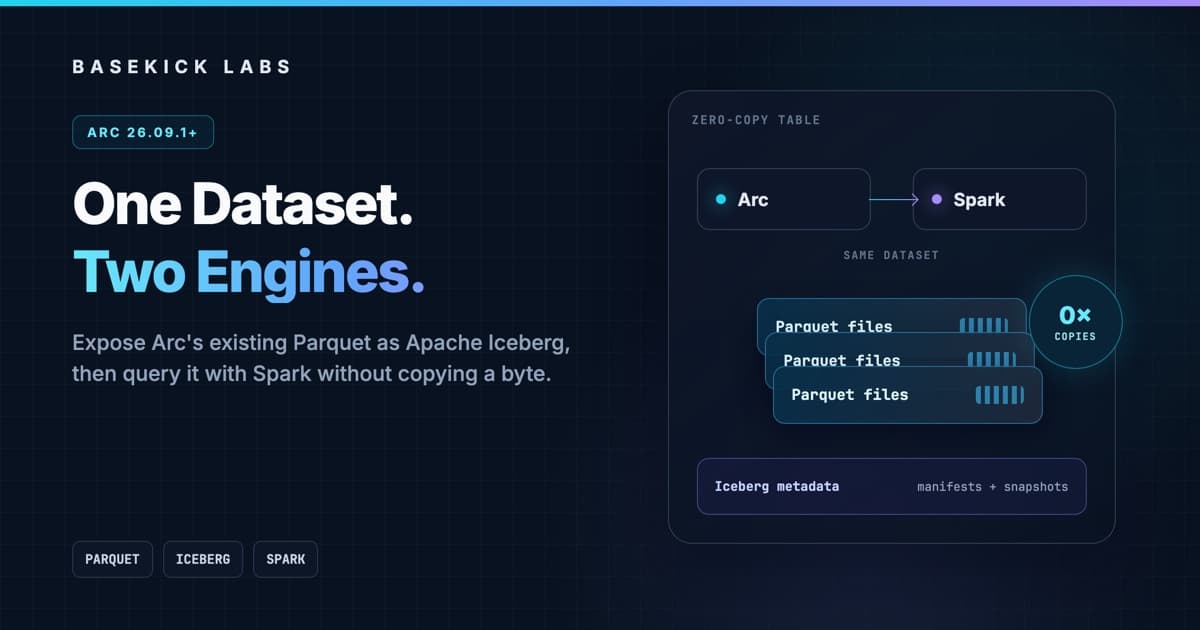
Most "Iceberg integrations" are export pipelines. Your database writes its own format, a job reads it, and another job writes a second set of Parquet files with Iceberg metadata around them. Now you have two copies, two failure modes, and a lagging lakehouse table to operate.
Arc does something simpler.
Arc already stores your data as Parquet. Starting in Arc 26.09.1, a background reconciler can register those existing files in an Apache Iceberg table by reference. Arc keeps serving the data through its SQL API, while Spark, Trino, and other Iceberg-aware engines can read the same bytes through the Iceberg metadata layer.
No re-export. No duplicate Parquet. No second ingest path.
In this tutorial we'll run Arc on port 18091, write a small telemetry dataset, query it from Apache Spark instead of DuckDB, compact four files into one, and create an Arc backup. At every step, Arc and Spark will see the same eight rows.
Version note: Iceberg export first shipped in 26.09.1. We re-ran every command below against Arc's current development branch on September 16, 2026, including post-26.09.1 hardening around compaction and backup reconciliation. For compaction- or restore-heavy deployments, use the newest available patch release.
What Arc actually publishes
Iceberg is a table format, not a replacement for Parquet. Its metadata describes the schema, partitions, snapshots, manifests, and the data files that make up the current table.
Arc's reconciler runs outside the ingest path. On each pass it:
- Lists the Parquet files Arc currently owns for a measurement.
- Compares that list with the Iceberg table's current snapshot.
- Adds new files and removes files that compaction, retention, or delete operations replaced.
- Commits the change as a new Iceberg snapshot.
- Expires old snapshots according to
iceberg.retain_snapshots.
The important bit is what it does not do: it does not decode, rewrite, upload, or copy your data files.
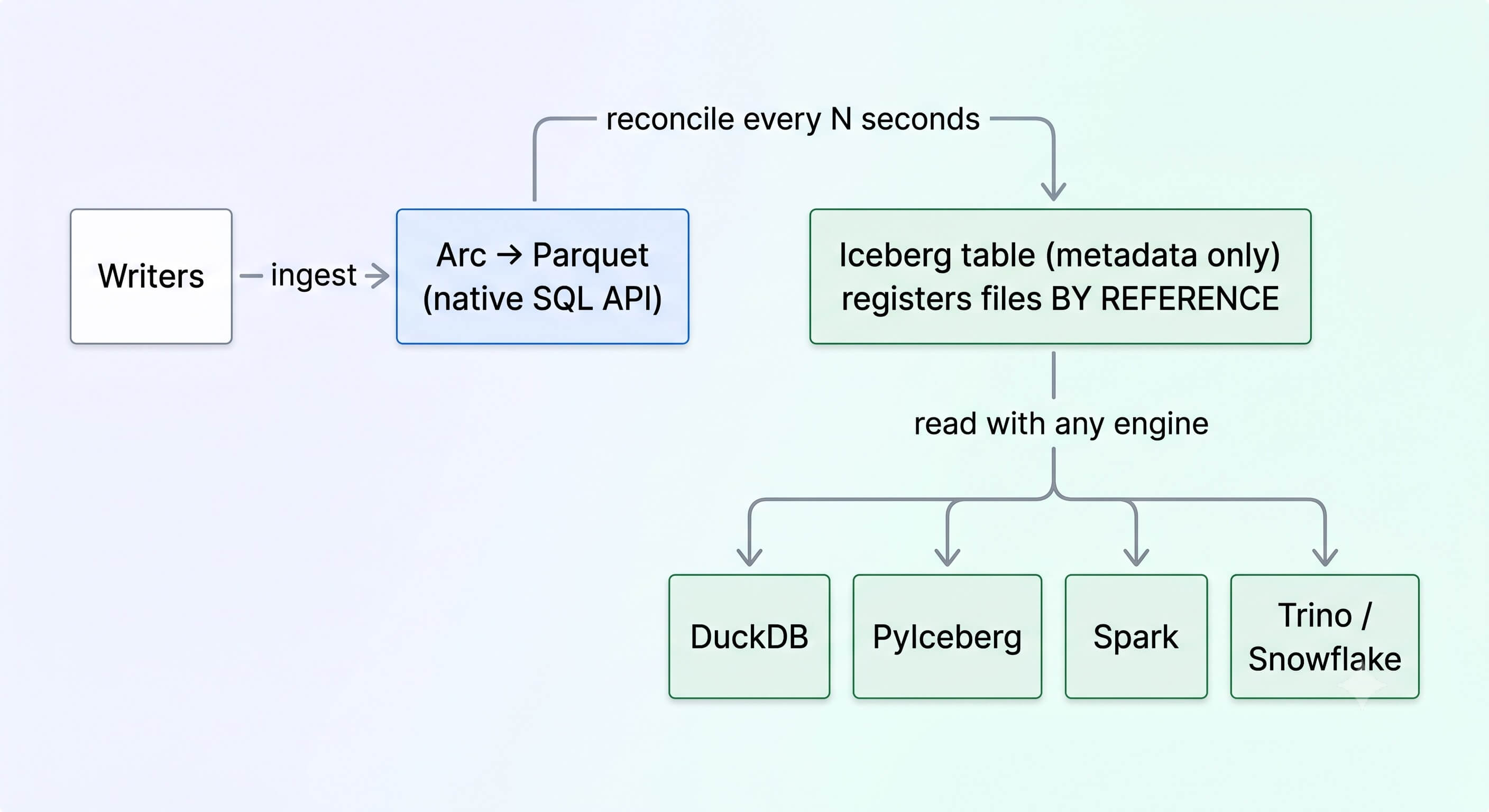
Because reconciliation starts from the files actually present on storage, it is convergent. If one pass fails, the next pass sees the same difference and tries again. Measurements whose file set has not changed are skipped.
Step 1: enable Iceberg
For a normal installation, this is the production configuration:
# arc.toml
[storage]
backend = "local"
local_path = "/var/lib/arc/data"

[iceberg]
enabled = true
reconcile_interval = 300  # seconds; this is the default
retain_snapshots = 10     # default
namespace_prefix = "arc" # default
The one required setting is iceberg.enabled = true. The rest above are defaults, included so the operating model is visible.
For this walkthrough, start from an empty directory so Arc's default relative paths all resolve under one place:
mkdir arc-iceberg-demo
cd arc-iceberg-demo

export ARC_SERVER_PORT=18091
export ARC_AUTH_BOOTSTRAP_TOKEN="arc_iceberg_demo_token_change_me_123"
export ARC_TELEMETRY_ENABLED=false
export ARC_ICEBERG_ENABLED=true
export ARC_ICEBERG_RECONCILE_INTERVAL=5

# Demo-only settings: flush tiny files and compact this tiny dataset.
export ARC_INGEST_MAX_BUFFER_SIZE=2
export ARC_INGEST_MAX_BUFFER_AGE_MS=100
export ARC_COMPACTION_DAILY_MIN_FILES=2
export ARC_COMPACTION_DAILY_SKIP_FILE_AGE_CHECK_DAYS=1

arc
Install Arc with Homebrew (brew install basekick-labs/tap/arc), a package from the 26.09.1 release, or a newer release. The high port keeps this demo away from another Arc instance you may already have on 8000.
The lowered ingest and compaction thresholds are for the eight-row demonstration only. Leave the production defaults in place for real workloads.
On startup, look for:
{"component":"iceberg-scheduler","message":"Iceberg reconcile scheduler started","interval":5000}
{"warehouse":"file:///.../arc-iceberg-demo/data/arc","interval_s":5,"message":"Iceberg export enabled"}
Step 2: write one dataset to Arc
Open a second terminal in arc-iceberg-demo. Install arcli, then point it at the Arc instance on our high port:
brew install basekick-labs/tap/arcli

export ARC_TOKEN="arc_iceberg_demo_token_change_me_123"
export ARC_ENDPOINT="http://127.0.0.1:18091"

arcli ping
The environment variables create an ad hoc connection for this terminal, so the walkthrough does not change your saved arcli profiles.
These four writes create four small Parquet files. Each command sends two CPU readings, for eight rows total:
printf '%s\n' \
  'cpu,host=edge-01,region=west usage=41.2,temperature=67.1 1789448400000000000' \
  'cpu,host=edge-02,region=west usage=38.4,temperature=66.8 1789448460000000000' \
  | arcli write --database telemetry

printf '%s\n' \
  'cpu,host=edge-01,region=west usage=44.7,temperature=68.2 1789448520000000000' \
  'cpu,host=edge-02,region=west usage=40.1,temperature=67.4 1789448580000000000' \
  | arcli write --database telemetry

printf '%s\n' \
  'cpu,host=edge-01,region=west usage=47.3,temperature=69.0 1789448640000000000' \
  'cpu,host=edge-02,region=west usage=42.9,temperature=68.1 1789448700000000000' \
  | arcli write --database telemetry

printf '%s\n' \
  'cpu,host=edge-01,region=west usage=49.8,temperature=69.7 1789448760000000000' \
  'cpu,host=edge-02,region=west usage=45.5,temperature=68.9 1789448820000000000' \
  | arcli write --database telemetry
Each command prints OK. Check the dataset through Arc first:
arcli query --database telemetry -o csv \
  "SELECT count(*) AS rows,
          count(DISTINCT host) AS hosts,
          round(avg(usage), 2) AS avg_usage
   FROM cpu"
rows,hosts,avg_usage
8,2,43.74Give the reconciler one interval, then inspect the files:
find data/arc -type f | sortThe relevant shape is:
data/arc/
├── telemetry/cpu/2026/09/15/05/
│   ├── cpu_...parquet
│   ├── cpu_...parquet
│   ├── cpu_...parquet
│   └── cpu_...parquet
└── arc_telemetry.db/cpu/metadata/
    ├── 00000-....metadata.json
    ├── 00001-....metadata.json
    ├── ...-m1.avro
    ├── snap-....avro
    ├── v0.metadata.json
    ├── v1.metadata.json
    └── version-hint.text
There is no second data directory under arc_telemetry.db/cpu. It contains only metadata. The Iceberg manifests point back to the four Parquet files under telemetry/cpu.
Arc maps the database telemetry to the Iceberg namespace arc_telemetry, then creates one table per measurement. Change iceberg.namespace_prefix if you want a different prefix.
Step 3: query those same files with Apache Spark
Now bring in a completely separate query engine. Apache Iceberg publishes a runtime JAR for Spark 3.5; Spark can load the table directly from its directory and resolve the current snapshot through version-hint.text.
Create an isolated Python environment:
python3 -m venv .venv
source .venv/bin/activate
pip install pyspark==3.5.7
Then run this from arc-iceberg-demo:
SPARK_LOCAL_IP=127.0.0.1 python3 - <<'PY'
from pathlib import Path
from pyspark.sql import SparkSession

spark = (
    SparkSession.builder
    .appName("arc-iceberg")
    .master("local[2]")
    .config(
        "spark.jars.packages",
        "org.apache.iceberg:iceberg-spark-runtime-3.5_2.12:1.11.0",
    )
    .config(
        "spark.sql.extensions",
        "org.apache.iceberg.spark.extensions.IcebergSparkSessionExtensions",
    )
    .config("spark.ui.enabled", "false")
    .getOrCreate()
)

spark.sparkContext.setLogLevel("ERROR")
table = Path("data/arc/arc_telemetry.db/cpu").resolve().as_uri()

df = spark.read.format("iceberg").load(table)
df.createOrReplaceTempView("cpu")

spark.sql("""
    SELECT region,
           count(*) AS rows,
           count(DISTINCT host) AS hosts,
           round(avg(usage), 2) AS avg_usage,
           round(max(temperature), 1) AS max_temperature
    FROM cpu
    GROUP BY region
""").show(truncate=False)

spark.stop()
PY
Spark returns:
+------+----+-----+---------+---------------+
|region|rows|hosts|avg_usage|max_temperature|
+------+----+-----+---------+---------------+
|west  |8   |2    |43.74    |69.7           |
+------+----+-----+---------+---------------+
That query did not call Arc's API. Spark read the Iceberg metadata and then opened the same Parquet files Arc created during ingest.
For a distributed Spark or Trino deployment, mount the local warehouse at the same absolute path on every worker and give the engine read permission. Iceberg metadata contains absolute data-file locations in this local-storage release. A shared catalog gives you name-based discovery, but it does not remove that filesystem requirement.
Step 4: compact Arc's files without breaking the table
Compaction is where a one-time export integration usually falls apart. Arc replaces small Parquet files as part of normal storage maintenance; an external table has to stop referencing the old files and start referencing the new one atomically.
Our demo settings make this small historical partition eligible for daily compaction. Confirm the candidate:
arcli compaction candidates --database telemetry -o json{"candidates":[{"database":"telemetry","file_count":4,"measurement":"cpu","partition_path":"telemetry/cpu/2026/09/15","tier":"daily"}],"count":1}Trigger it and let arcli wait for the cycle to finish:
arcli compaction trigger \
  --tier daily \
  --database telemetry \
  --wait
Inspect the completed job:
arcli compaction history -o jsonThe run used for this article reported:
{"files_compacted":4,"database":"telemetry","measurement":"cpu","partition_path":"telemetry/cpu/2026/09/15","success":true,"tier":"daily"}There is now one data file instead of four:
data/arc/telemetry/cpu/2026/09/15/
└── cpu_..._daily.parquet
Run the Spark script again. The result is still:
+----+-----+---------+
|rows|hosts|avg_usage|
+----+-----+---------+
|   8|    2|    43.74|
+----+-----+---------+
The table location did not change. Arc's next reconcile snapshot removed the four source-file references and added the compacted file. Spark opened a fresh session, resolved the new snapshot, and saw the same logical table.
Retention and full-file deletes follow the same model: Arc owns the physical file lifecycle, and the reconciler publishes the resulting file set. External readers should treat Arc's Iceberg tables as read-only; letting two systems rewrite the same table would give you two owners for one set of files.
Step 5: back up the data and the table metadata together
An Iceberg table is not recoverable if you save only its Parquet files. You also need its metadata and catalog pointers. Arc's backup system handles both.
Start a backup and wait for it to complete:
arcli backup create --wait -o jsonOur run completed all 17 files with none skipped:
{"operation":"backup","status":"completed","total_files":17,"processed_files":17,"skipped_files":0}Inside the backup are:
- the compacted Parquet data file;
- the Iceberg metadata JSON, manifest Avro files, snapshots, and
version-hint.text; - Arc's SQLite metadata database, which includes the Iceberg catalog;
- the Arc backup manifest.
If iceberg.warehouse is outside storage.local_path, current Arc builds copy that warehouse metadata into the backup's dedicated iceberg/ section. Keep the same configured warehouse path when restoring because the local Iceberg metadata stores absolute locations. Restart Arc promptly after an Iceberg restore so the process reopens the restored catalog before reconciliation resumes.
Configuration reference
| Setting | Default | What it controls |
|---|---|---|
iceberg.enabled | false | Starts the export reconciler. |
iceberg.reconcile_interval | 300 | Seconds between passes. Readers can lag live ingest by up to this interval. |
iceberg.retain_snapshots | 10 | Recent Iceberg snapshots retained per table. Must be at least 1. |
iceberg.namespace_prefix | arc | Namespace prefix; database telemetry becomes arc_telemetry. |
iceberg.warehouse | storage root | Location for Iceberg table metadata. |
iceberg.catalog_db_path | shared Arc DB | SQLite Iceberg catalog location. |
Environment variables use Arc's normal mapping: uppercase the key, replace dots with underscores, and add ARC_. For example, iceberg.reconcile_interval becomes ARC_ICEBERG_RECONCILE_INTERVAL.
Boundaries to know before production
The first release is intentionally narrow:
- Local primary storage only. Arc refuses to start with Iceberg enabled on a non-local backend.
- No cold-tier combination. Arc also refuses Iceberg plus cold-tier migration because moving a referenced file away would create a table with holes.
- Eventual consistency. The Iceberg view follows the most recent successful reconcile pass, not every acknowledged write.
- One owner. Arc owns writes, compaction, retention, deletes, backup, and restore. External engines read the published table.
- Absolute paths. Another host or container must see the warehouse at the same path used in the Iceberg metadata.
- Single reconciler in a cluster. Arc ties Iceberg reconciliation to the active compactor role so only one node commits table metadata.
Those constraints are guardrails. When Arc cannot publish a complete table, it fails at startup or leaves the last good snapshot in place instead of silently serving a partial one.
One write, two query paths
We wrote eight rows once. Arc queried them through its native API. Spark queried the same rows through Apache Iceberg. Arc compacted four files into one, Spark still saw eight rows, and Arc backed up the Parquet, Iceberg metadata, and catalog together.
That is the whole idea: Arc remains the operational owner of the dataset, while Iceberg makes the same dataset available to the rest of the analytics ecosystem.
No exporter. No copy. No proprietary connector in the read path.
Iceberg export is available in Arc 26.09.1 and later. See the 26.09.1 release notes and the Apache Iceberg integration documentation for the latest engine-specific guidance.