Arc for Iceberg · AWS
Telemetry in. Iceberg tables in your S3 bucket.
For data and platform teams whose analytics already run on Athena, Redshift, Snowflake or Databricks, and whose machines, devices and services produce a continuous stream that has to land there.
The problem: streaming into Iceberg means running an ingest service, a compaction job, snapshot expiry and something to keep the catalog in step, or the lake fills with small files and stale tables.
Arc is one process that does all four. It writes Parquet to your bucket and keeps every measurement as a compacted Iceberg table registered in AWS Glue. You keep the bucket, the catalog and the engine.
Arc 27.01.1Arrives in Arc 27.01.1, the next release. Part of open-source Arc, no license key needed.
How it fits
Arc writes. Your engines read.
You run Arc in your AWS account, next to the bucket. It needs write access to the bucket and to the arc_* databases in Glue. Everything downstream is read-only.
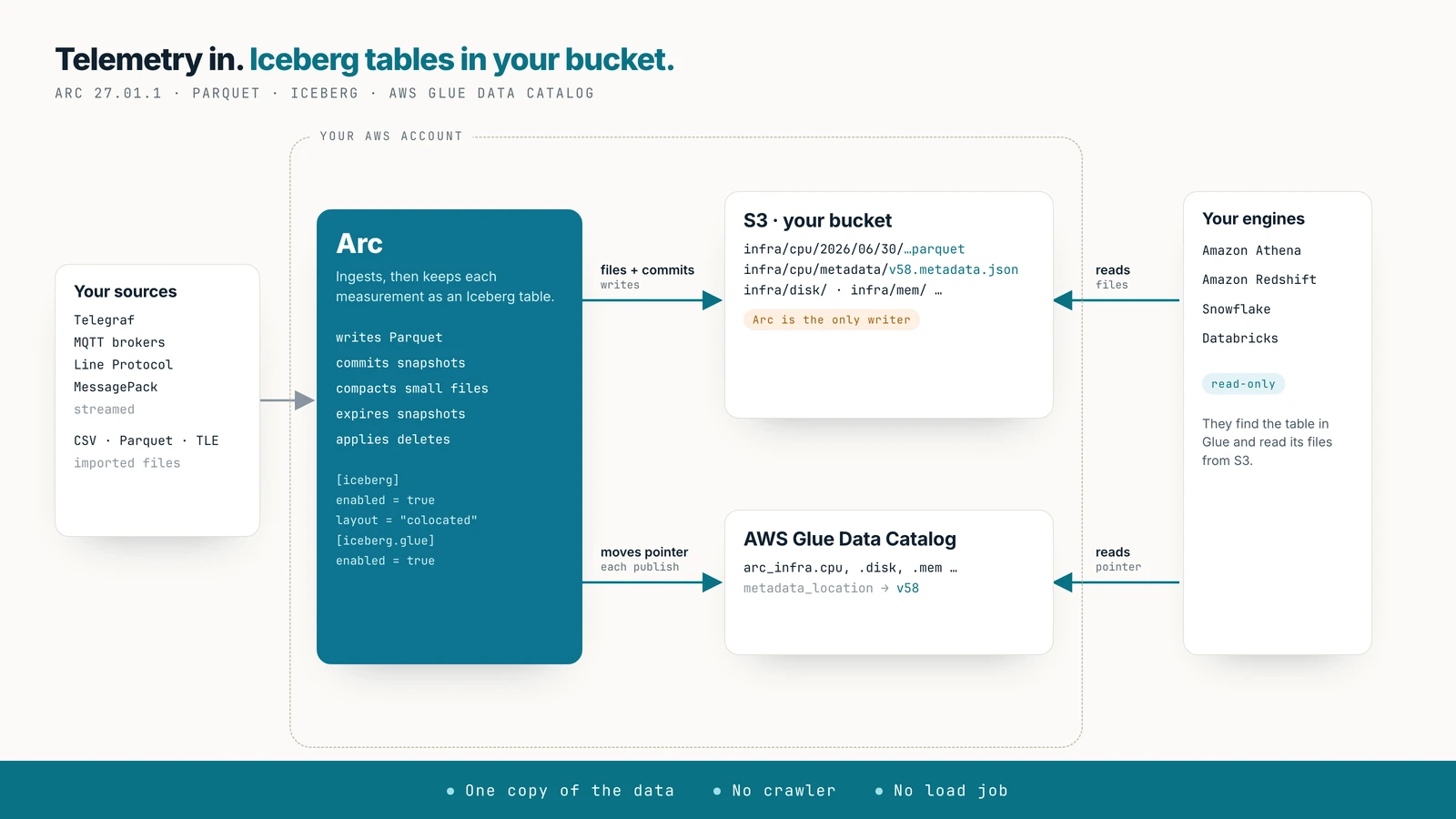 Open the diagram at full size (opens in a new tab)
What Arc does
Ingest and table upkeep, in one process
Each of these is usually a separate service or scheduled job. In Arc they are parts of the same binary, and they apply to the tables Arc writes.
Ingest
The protocols your devices and agents already speak
InfluxDB Line Protocol and columnar MessagePack over HTTP, MQTT topics that Arc subscribes to itself, output plugins for Telegraf and Redpanda Connect, and nodes for Node-RED. Files come in too: CSV, Line Protocol, Parquet you already have, and satellite TLE catalogs.
Tables
Every measurement is an Iceberg table
Arc writes Parquet to your bucket and registers those same files in an Iceberg table, by reference. There is one copy of the data. On a single node new rows reach the table in about a minute.
Catalog
Registered in AWS Glue, kept current
Each Arc database is a Glue database, each measurement a table. Arc moves the Glue pointer after every publish, so there is no crawler to schedule and no CREATE TABLE to run in Athena or Redshift.
Maintenance
Small files merged, metadata kept bounded
Hourly and daily compaction merge the small files that streaming ingest leaves behind, and the table swaps old files for the merged one in a single snapshot. Arc expires old snapshots, merges manifests and removes unreferenced metadata on its own.
Lifecycle
Deletes and retention reach the table
When a retention run or the row-delete API (off by default) removes data, the next export removes it from the Iceberg table too. Deletes are copy-on-write: readers never have to apply delete files. Scheduled retention is an Arc Enterprise feature; in Arc OSS you trigger a policy through the API.
Schema
New columns appear without a migration
Send a field Arc has not seen and it becomes a column in the Parquet files and in the Iceberg schema. Changing the type of an existing column is the exception: it stops that table’s export until it is resolved.
Read in place
The engines we ran it with
Each of these was run end to end against Arc's tables on S3, and each has a guide with the exact steps.

Amazon Athena
Arc's measurements appear as tables in Athena's AwsDataCatalog. No crawler, no CREATE TABLE.

Amazon Redshift
Redshift Serverless mounts the Glue Data Catalog on its own, so Arc's tables are queryable with three-part names.

Snowflake
A catalog-linked database on Arc's own REST catalog, or one Iceberg table per measurement through Glue, reading Arc's files through a read-only external volume.

Databricks
Unity Catalog reads Arc's tables through an AWS Glue foreign catalog. Arc keeps the Glue tables current.
Through Glue, Snowflake needs one CREATE ICEBERG TABLE per measurement. With Arc's own Iceberg REST catalog turned on and reachable from Snowflake, a catalog-linked database picks up new tables by itself. Google BigQuery reads the same Glue tables through BigQuery Omni, in the AWS regions Omni runs in. Trino, Spark and DuckDB are on the integrations page.
Configuration
Three sections of arc.toml
Point Arc at the bucket, turn on the export, turn on the Glue registration. After the first pass every database is a Glue database named arc_<database>.
- Credentials. The export uses the credentials Arc already uses for S3: static keys, the default chain, IRSA on EKS or an assumed role. They also need the Glue table and database calls listed in the docs.
- Layout.
colocatedkeeps each table's metadata beside its data files, which Databricks needs and the other guides used. Choose it before the first table is created: the layout applies to new tables only. - Databricks. Unity Catalog also asks for a second, writable scratch bucket of its own. The guide covers it.
Iceberg export reference (opens in a new tab)Athena & Redshift walkthrough (opens in a new tab)
arc.toml
[storage]
backend   = "s3"
s3_bucket = "my-lake-bucket"
s3_region = "us-east-2"

[iceberg]
enabled = true
layout  = "colocated"   # table metadata beside the data files

[iceberg.glue]
enabled = true          # one Glue database per Arc database
These keys need Arc 27.01.1. Released versions export Iceberg on local storage only.
Before you build on it
What a data engineer will ask
The answers, up front. The full list is in the limitations section of the docs (opens in a new tab).
Arc is the only writer
Engines get read-only access. No MERGE, no OPTIMIZE and no VACUUM from Snowflake, Athena or Databricks, and AWS Glue table optimizers stay off.
Format v2, copy-on-write
Tables are Iceberg format version 2 with no delete files. A partial delete rewrites the affected Parquet file under a new path.
Partitioned by day of time
Every table is partitioned by day(time), and that is fixed. Engines prune by time range from the Iceberg metadata, so filter on time. Arc’s ingest and compaction keep every file within one hour or one day. A file that reached the bucket another way and spans several days, or has no time values, stays queryable in Arc but is left out of the Iceberg table, and Arc logs it.
No time travel across compaction
A pass that removes a file expires every older snapshot, because those snapshots name files Arc has deleted. Snapshot history is for consistency, not for auditing.
A swap can interrupt a long query
When compaction replaces files, a query that planned against the previous snapshot can hit a missing file. Re-running it reads the new snapshot.
One node exports
A single Arc node runs the export. High availability needs an Arc Enterprise cluster, where the table follows the timed pass (five minutes by default) instead of each flush.
What it is not
- A change-data-capture tool. Arc has no connectors that replicate Postgres, MySQL or MongoDB.
- A maintenance service for Iceberg tables written by Spark, Flink or anything else. Arc maintains the tables it writes.
- A replacement for your warehouse. Arc has a SQL engine of its own, but this setup is about feeding the one you already use.
- Multi-cloud. This page covers S3 and AWS Glue. Arc also exports Iceberg on local disk and serves an Iceberg REST catalog; those are in the docs.
FAQ
Questions
Is this a new product?
No. It is Arc, the open-source database, set up for one job: taking telemetry and events in and keeping them as Apache Iceberg tables in your S3 bucket. The Iceberg export and the AWS Glue registration are part of open-source Arc and need no license key.
Can I run it today?
The Iceberg export on S3 and the AWS Glue registration arrive in Arc 27.01.1, the next release. Released versions export Iceberg tables on local storage only. Leave your email below and we will write when 27.01.1 is out.
Why not Kinesis streaming tables or Amazon Data Firehose?
If your data already flows through Kinesis or Firehose, AWS can deliver it into Iceberg tables for you, and that is a good choice. Arc is for telemetry that is not on a stream yet. It takes the protocols devices and agents already speak (Telegraf, InfluxDB Line Protocol, MQTT, MessagePack), with no stream, producer SDK or IoT rule in front of it. Ingest, compaction, snapshot expiry and the Glue registration run in one process, sized and paid for as the machine it runs on rather than per gigabyte delivered. The same rows are queryable with SQL in Arc within seconds, before the Iceberg table picks them up, and Arc also runs on-premises and at the edge with the same SQL.
How fresh is the data my warehouse sees?
On a single Arc node, a flush asks for an export of its table, so new rows reach the Iceberg table in about a minute. On a cluster, the table is updated by the timed pass, every five minutes by default. Each engine then adds its own metadata refresh on top.
Does Arc copy my data into the Iceberg tables?
No. Arc already writes Parquet. The export registers those same files in the Iceberg table by reference, so there is one copy of the data and only a small amount of Iceberg metadata beside it.
Can Snowflake, Athena or Databricks write to these tables?
No. Arc is the only writer. Give the engines read-only access to the bucket and leave AWS Glue table optimizers off: a DROP TABLE with PURGE, a VACUUM or an orphan-file cleanup run from an engine would delete files that Arc owns.
Can Arc compact or maintain Iceberg tables it did not write?
No. Arc maintains the tables it creates from its own ingest. It does not take over existing Iceberg tables written by Spark, Flink or another tool.
Does Arc replicate databases into Iceberg, like a CDC tool?
No. Arc takes data that is pushed to it: InfluxDB Line Protocol and MessagePack over HTTP, MQTT topics it subscribes to, and files you import: CSV, Line Protocol, existing Parquet and satellite TLE catalogs. It has no change-data-capture connectors for Postgres, MySQL or MongoDB.
Do you run it for me?
Arc Enterprise Managed runs Arc on dedicated servers that we operate. Running this setup for you inside your own AWS account is not something we offer today. If that is what you would want, say so in the form: it is the thing we are trying to learn.
Get notified
We will write when 27.01.1 is out
One email when the release is available, with the guide for the engine you picked. If you want to try it against your own bucket before that, say so and we will help you set it up.
The two questions on the form are what we most want to learn: which engine you read with, and whether you would run Arc yourself or want it run for you.
Already running Arc? The export on local storage is in the released version: download Arc.