
Arc stores everything as Parquet, in a bucket you own, and since 26.09.1 it can describe those files as Apache Iceberg tables. The point of an open format is that engines Arc has never heard of can read it. Databricks is where a lot of data teams already work, so it's the engine we most wanted to prove that on.
The question was simple: can Databricks read Arc's own Parquet files, with no pipeline in between?
It can. With Arc 27.01.1 on S3, Arc registers every table it publishes in AWS Glue, and Databricks reads Glue through a Unity Catalog foreign catalog. A query, a notebook or an AI/BI dashboard in Databricks reads the files Arc wrote, in your bucket. Nothing is copied and nothing is scheduled. Everything below ran on the free edition of Databricks.
It did not work the first time.
How it works
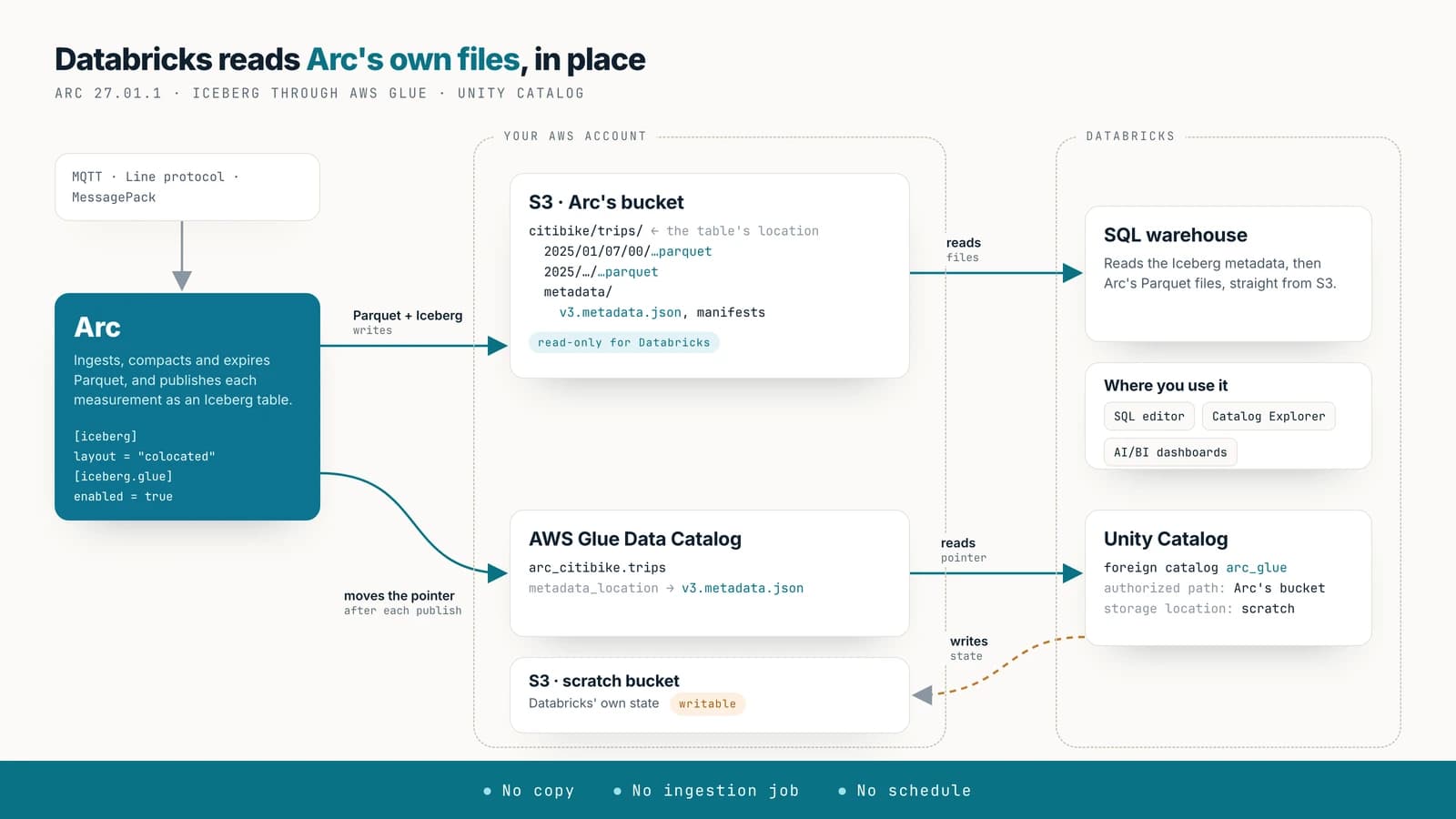
Arc has exported its data as Iceberg tables since 26.09.1: it writes Iceberg metadata that describes the Parquet files it already has, and keeps it current as data arrives, compacts and expires.
What an engine also needs is a catalog: somewhere to ask "where is the current version of this table?" Arc 27.01.1 answers that in two ways. It serves the Iceberg REST catalog protocol itself, which Snowflake, Trino, Spark and PyIceberg can use directly. And it registers each table in AWS Glue.
Databricks needs the second one. Unity Catalog federates a fixed list of catalogs, AWS Glue among them, not an arbitrary Iceberg REST endpoint. So Arc goes to where Databricks already looks.
What Arc does in Glue
With iceberg.glue.enabled = true, Arc keeps one Glue table per published table: database arc_citibike, table trips. Glue stores only a pointer, the metadata_location of the current Iceberg version. Arc keeps writing its own metadata as before, and moves the pointer within seconds of each publish.
Glue is shared, so Arc is careful about what it touches. Every table it creates carries arc.* properties naming the deployment, database and measurement, and Arc never changes or deletes a Glue table it did not create, or one another writer has committed to. When an Arc database is dropped, its Glue tables go only after two consecutive checks agree they are gone.
The first attempt
We started with a small synthetic table to get the plumbing right: an IAM role Databricks can assume, a credential for Glue, read access to Arc's bucket, a Glue connection and a foreign catalog called arc_glue. The table showed up in the catalog straight away. Then the first query failed:
Failed to instantiate org.apache.hadoop.mapred.FileInputFormatDatabricks had read the table from Glue as a Hive table. Its documentation explains why: to read Iceberg tables through Glue federation, the foreign catalog needs a storage location of its own. You can't add one afterwards on the free edition (ALTER CATALOG … SET MANAGED LOCATION isn't enabled there), so we dropped the catalog and created it again, with Arc's bucket as the storage location.
PERMISSION_DENIED: The storage location for a foreign catalog … will be used
for unloading data and can not be read-only.
Databricks writes to that location. We had given it read-only access to Arc's bucket on purpose, and we weren't going to change that: Arc's bucket is Arc's. So Databricks got a small scratch bucket of its own, writable, and the catalog was created a third time.
The query got further, and failed reading the first data file:
Error while reading file s3://…/windfarm/turbine/2026/11/17/20/turbine_….parquet.
java.nio.file.AccessDeniedException
We had seen this shape before, with Microsoft Fabric. By default Arc keeps a table's Iceberg metadata in a warehouse directory, arc_windfarm.db/turbine/metadata/, and the data in the measurement's own folder, windfarm/turbine/. The table's location is the metadata directory. A OneLake shortcut can only see files inside the folder it points at, and Databricks, it turns out, only reads files under a federated table's location. The data was one directory over.
That is the problem the colocated layout fixes. It's new in Arc 27.01.1, added when a OneLake shortcut in Fabric hit the same wall (that story is Wednesday's post):
[iceberg]
enabled = true
layout  = "colocated"
With it, a table's location is the measurement's folder, and the metadata sits inside it next to the data. We restarted Arc with the setting, wrote to a new measurement, and Databricks read it: 200 rows, the full time range, on the first try.
Two engines from two vendors, built on different ideas, made the same assumption about where a table's files live. Neither assumption is wrong. It's the shape every table those engines write has, and the colocated layout gives Arc's tables that shape too.
Real data, and a schema that changed over the years
Synthetic tables prove the plumbing. For the dashboard we wanted real data, so we copied the Citi Bike measurement from our demo server straight into the S3 bucket: Arc's own Parquet files, as Arc wrote them, New York bike rides from 2013 to 2026.
Arc started exporting it, and Databricks refused the first version it published:
Cannot convert table to Delta as the table contains column names that only differ by case.Citi Bike changed its own published schema over the years. The early files call a column birth year, later ones Birth Year. Arc stores whatever each file says, and one Iceberg table has one schema; a case-insensitive engine like Databricks can't tell the two apart.
We dropped the years before 2020, and Arc's export stopped on the next change: latitude and longitude are strings in most years and doubles in 2023. That's the dataset, not Databricks and not Arc. But it showed us a gap in Arc: the export's error hid the column's name, because Arc's log sanitizer masks quoted text, so finding the cause took longer than it should have. Arc now logs the column, both types and the files involved as separate fields (#1744).
We kept 2025, whose schema is consistent: 5.2 million rides, a sample of the year from our demo server.
One more surprise. When we deleted the table in Arc and wrote it again with 2025 only, Databricks kept serving the old one: 21 million rides from 2020 and 2021, and errors on files that no longer existed. REFRESH TABLE didn't help. Dropping and recreating the foreign catalog did, and that changes nothing in Glue or S3. It's in the guide.
From Glue to a dashboard
The step-by-step guide, with every screen, is in the docs. In short: three credentials on one IAM role, two external locations, then a Glue connection whose last page creates the foreign catalog. The two paths on that page are what matter: authorized paths on Arc's bucket, read-only, and the storage location on the scratch bucket.
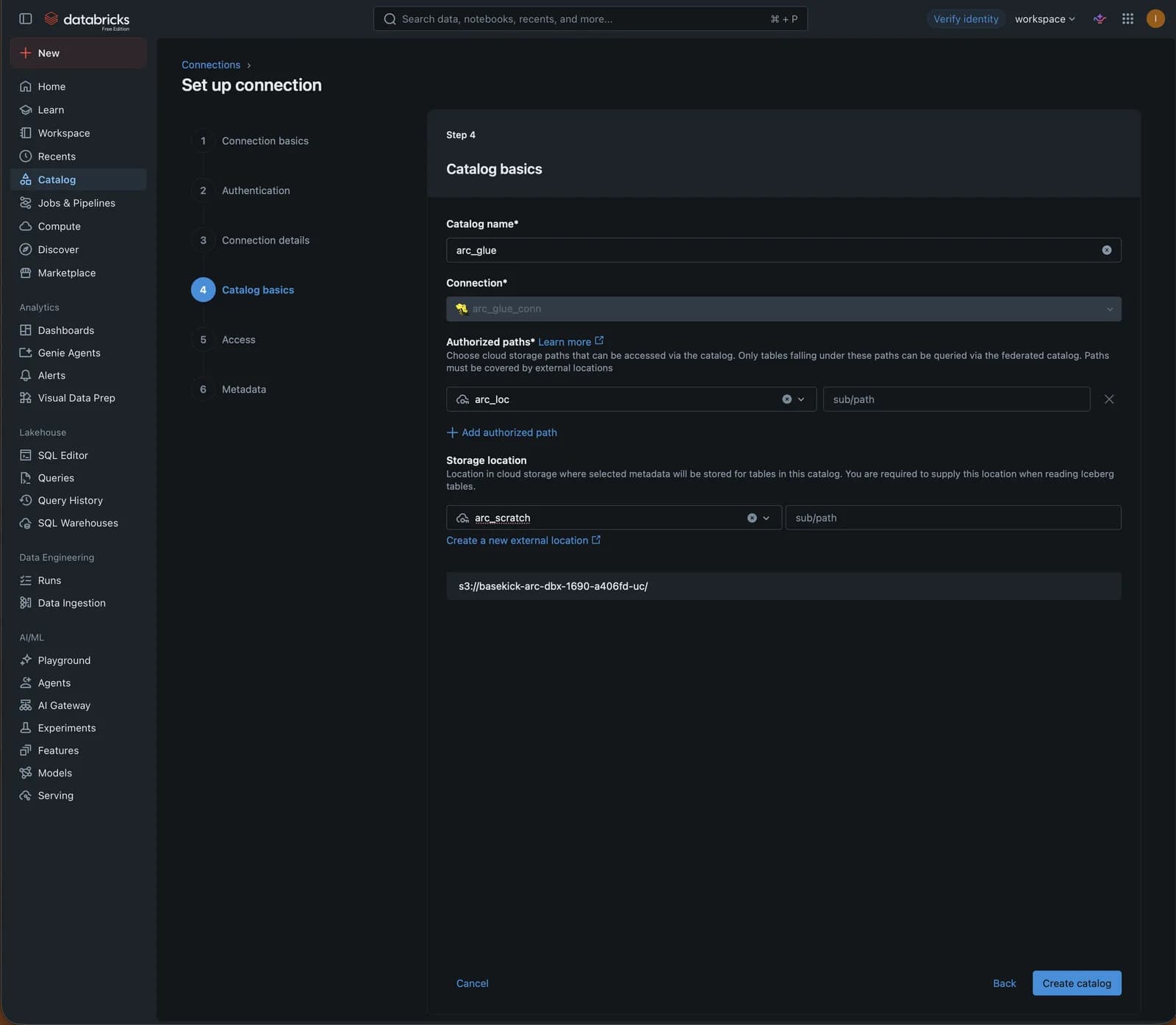
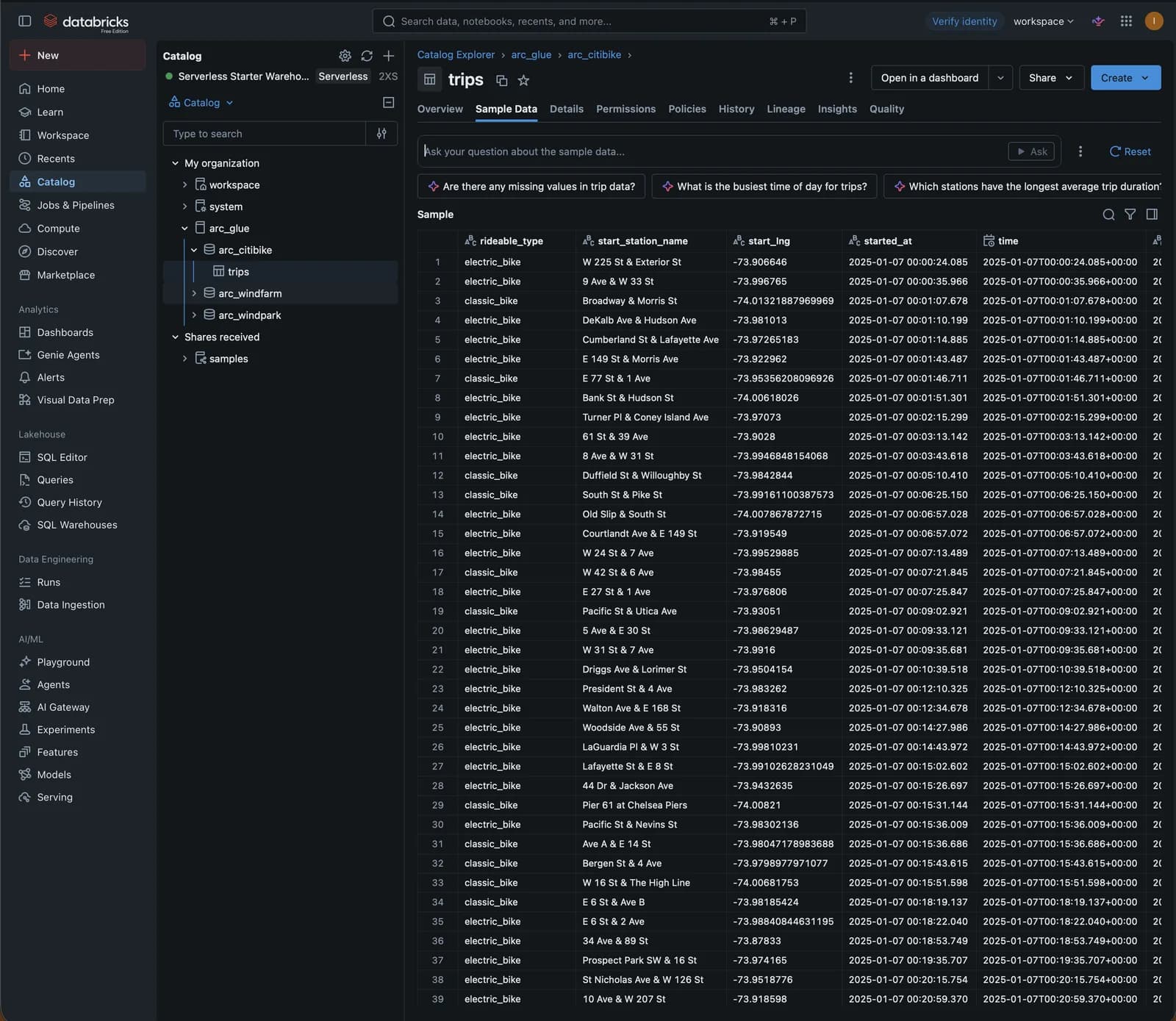
Each Arc database becomes a schema, and each measurement a table. Sample Data reads Arc's Parquet files straight from S3:
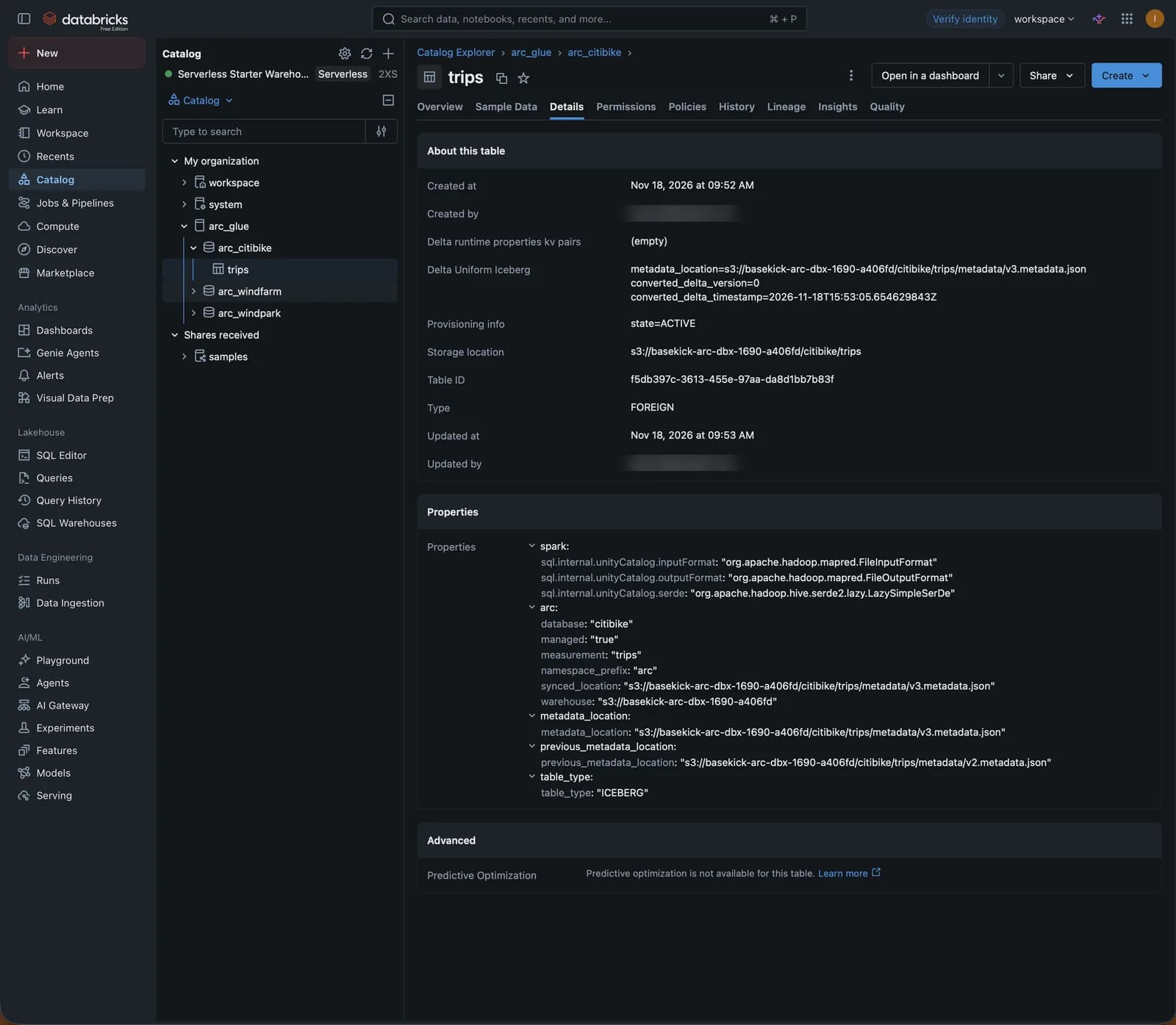
The table's Details tab shows the whole arrangement. The storage location is Arc's measurement folder. metadata_location is the Iceberg version Arc published last. The arc properties are the ownership marks Arc writes into Glue. And Databricks converts the Iceberg metadata to Delta on its own side ("Delta Uniform Iceberg"), without writing anything to Arc's bucket.
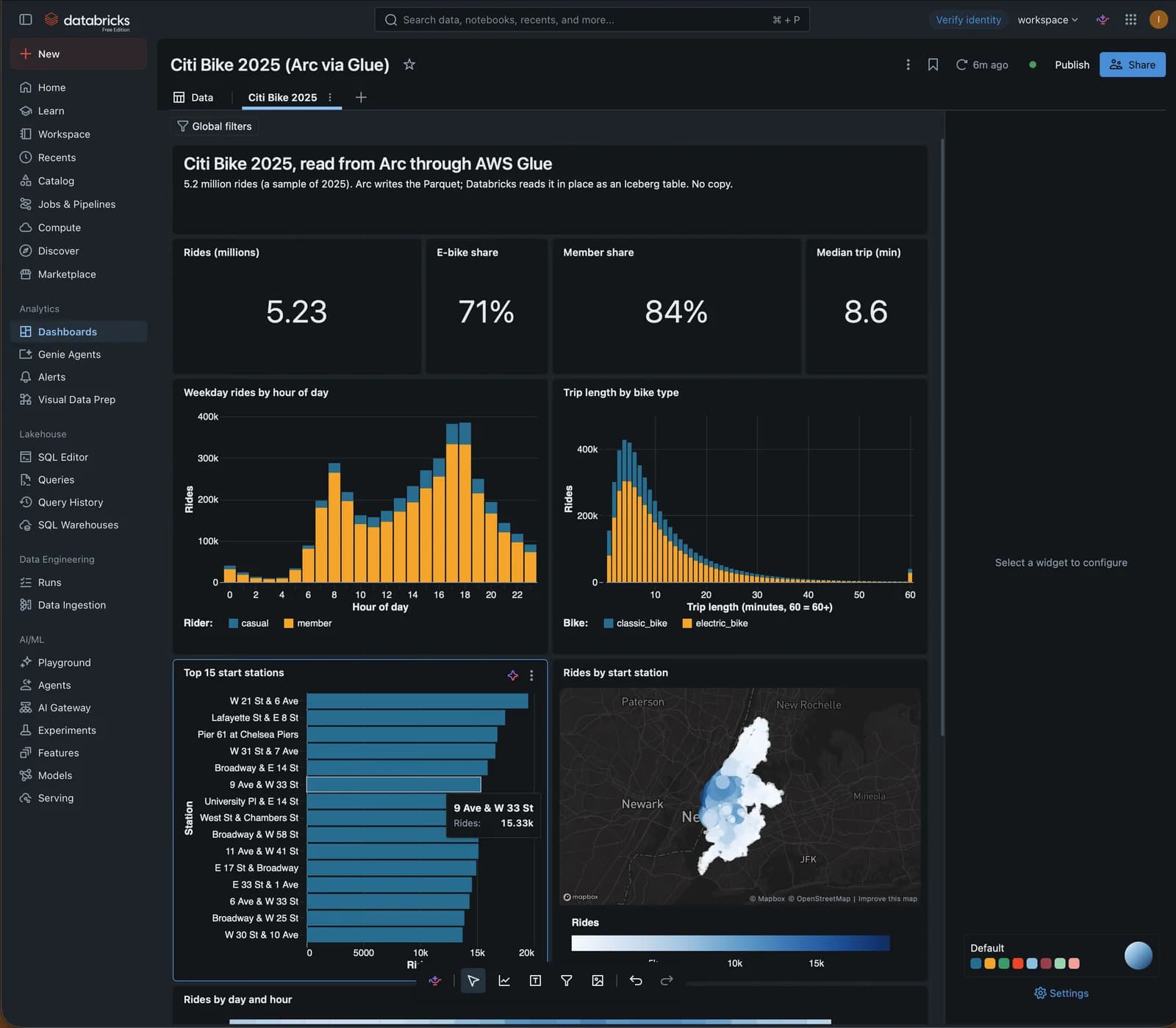
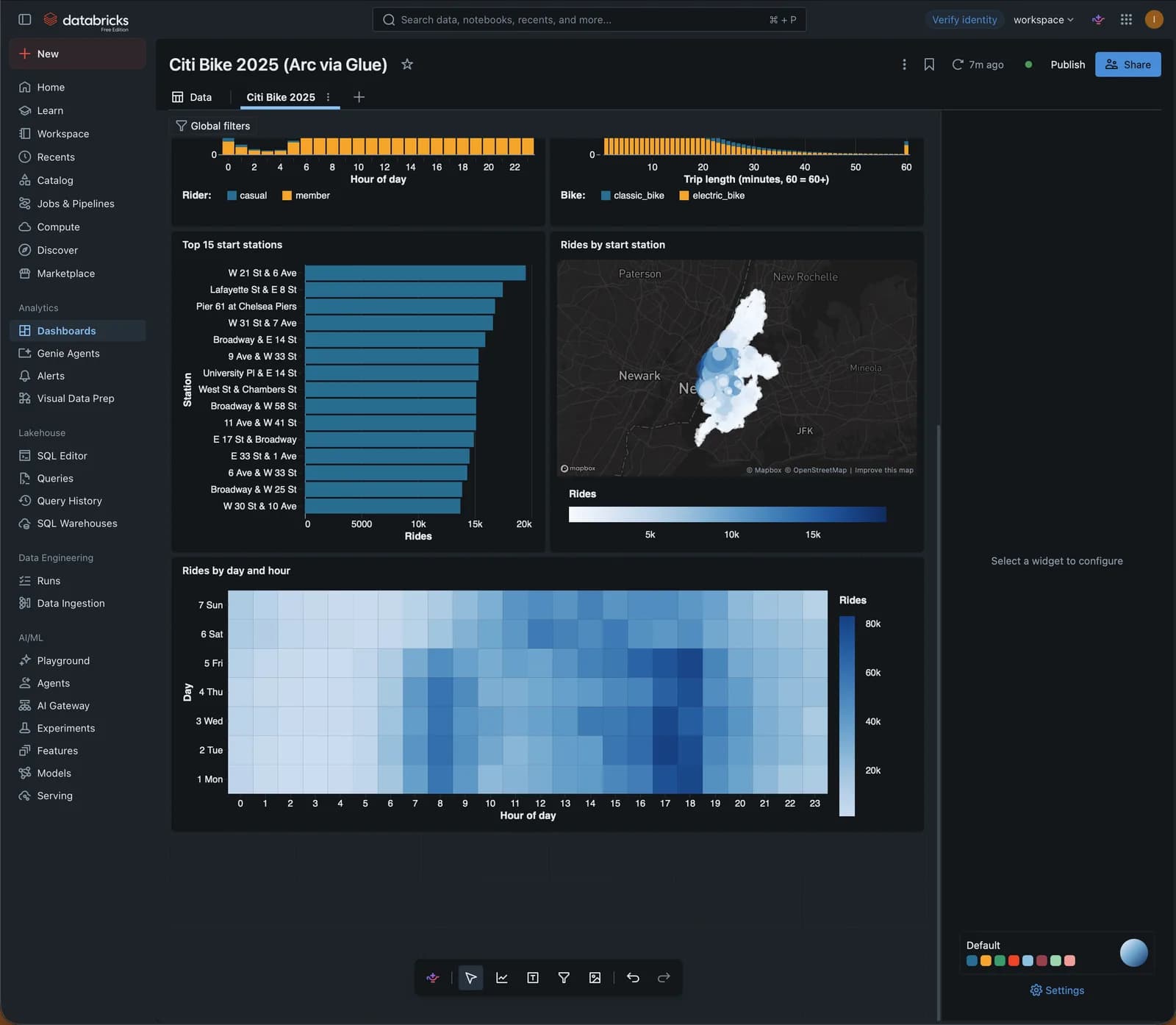
From there it's ordinary Databricks. The dashboard below is six SQL datasets over arc_glue.arc_citibike.trips and a canvas. 71% of rides are on e-bikes, 84% are by members, and the median trip is 8.6 minutes. On weekdays, ridership peaks at 8:00 and again at 17:00 and 18:00.
How fresh is it?
Nothing runs on a schedule in Databricks. Arc publishes a new table version on each export pass that finds changed files, moves the Glue pointer, and the next query reads it.
We measured it with Arc's export pass every 30 seconds. A write reached Databricks 26 seconds after Arc accepted it: 22 of those were waiting for the next pass, and the first query after Glue moved returned the new rows. The default pass runs every five minutes, so that's the bound to expect unless you lower it.
What to watch for
- Keep Databricks read-only on Arc's bucket. Glue accepts writes. A
DROP TABLE … PURGE, aVACUUMor an orphan-file cleanup through it deletes the data files the table names, and those are Arc's own files. The guide's IAM policy reads Arc's bucket and writes only to the scratch bucket. - Recreated tables. A table deleted and written again under the same name needs the foreign catalog recreated.
- One schema per measurement. If your source changed its schema over the years, keep each version in its own measurement, or normalise it before writing.
- Cold tier. On Arc Enterprise, files that tiering moves to a cold tier leave the table's folder, and Databricks can't follow them. Fabric's OneLake shortcuts have the same limit, and the fix is in progress.
What comes next
Snowflake reads the same Glue tables (CATALOG_SOURCE = GLUE) and Arc's REST catalog directly, and that's the next post. Then the cold tier, so a deployment that keeps years of history on cheaper storage can query all of it from these engines.
Why this matters to us
We didn't build a Databricks connector. Arc writes open files, describes them in an open table format, and registers them in a catalog Databricks already reads. Two settings in Arc and a few screens in Databricks, and an engine we had never integrated with ran a dashboard on Arc's data in place.
That's the bet behind Arc's storage. Your data stays as Parquet in your bucket, readable by whichever engine your team already uses, and Arc's job is to keep it that way while it ingests, compacts and expires.
Arc 27.01.1 ships in December. The full walkthrough, from the IAM role to the dashboard, with every screen and the errors you'll hit if a step is missing, is in the docs: Databricks.
If something doesn't read the way it should, open an issue. This post exists because a valid table didn't.