
Most modern plant equipment exposes its data over OPC UA, directly or through a gateway. PLCs, SCADA servers, and the protocol gateways in front of older Modbus or PROFINET equipment publish their tags through an OPC UA server, and something reads from it: a historian, a vendor platform, a cloud connector. The question this post answers is narrower and more practical. If you want those tags in a SQL database you run yourself, stored as files you can read without that database, what does the pipeline look like, and what goes wrong on the way?
There is a reason to ask now. On June 30, 2026, Schneider Electric announced an agreement to acquire Cognite, an industrial data and AI platform, in an all-cash deal valued at $3.1 billion. In the announcement, Schneider CEO Olivier Blum says the acquisition "strengthens AVEVA," Schneider's wholly owned industrial software company, and the release states that "upon completion, Cognite will be integrated with AVEVA." The deal is still subject to regulatory approvals and is expected to close "in the coming quarters." It may well be good news for Cognite customers. It is also a reminder that when your plant data lives inside a platform, the platform's owner decides where it goes next. Data stored in an open format, on storage you control, does not have that problem.
I built the whole pipeline end to end for this post: a simulated OPC UA server, Telegraf reading it over an encrypted, authenticated session, Arc storing the result as Parquet, SQL on top, and the same files read back through Apache Iceberg without Arc in the path. Every config and every output below comes from that run. I hit several real problems along the way, from duplicate rows to silently dropped values to a plugin that would not start, and I show each one, because you will probably hit them too. If you want the reference rather than the walkthrough, it is in the OPC UA integration docs.
The pattern

Open the diagram full size if it is hard to read on your screen.
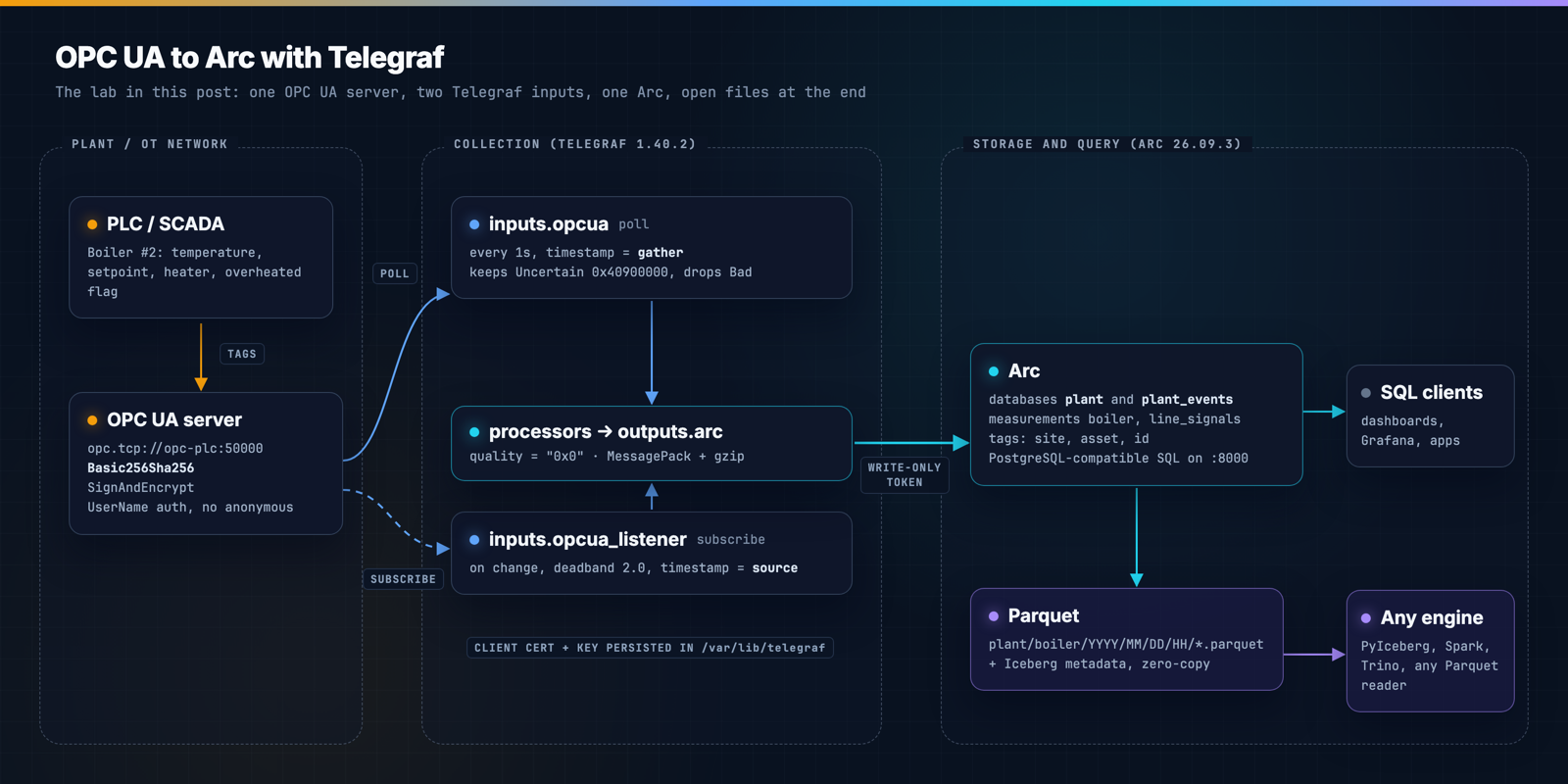
Arc does not speak OPC UA natively. Telegraf does, through two input plugins, and Telegraf has a native Arc output plugin (outputs.arc, Telegraf 1.37 and later) that writes Arc's MessagePack columnar format. So Telegraf is the bridge, and it is a well-understood one: it runs as a single binary next to the OPC UA server, it buffers when the database is unreachable, and the rest of your Telegraf estate already knows how to run it.
What the lab runs
| Component | Version | Role |
|---|---|---|
| Microsoft OPC PLC simulator | mcr.microsoft.com/iotedge/opc-plc:2.12.48 | OPC UA server with a simulated boiler and test signals |
| Telegraf | telegraf:1.40.2 | inputs.opcua (polling) and inputs.opcua_listener (subscriptions) |
| Arc | ghcr.io/basekick-labs/arc:26.09.3 | Storage and SQL, Iceberg export enabled |
| arcli | 26.09.4 | Arc operations: connection check, tokens, queries |
| PyIceberg | 0.10.0 | Reads the same data without Arc |
The simulator is the OPC PLC server that Microsoft publishes for testing industrial connectors. It exposes a boiler built on the OPC UA Device Integration companion model (Boiler #2, with current temperature, target temperature, heater state and an overheated flag), plus test signals including one that deliberately returns bad and uncertain status codes. The boiler heats toward its target of 80 (the simulator does not publish units), overshoots, trips the overheated flag, and cools, on a cycle of roughly two minutes. That gives the queries something real to find.
Step 1: the stack
Everything runs from one Compose file, docker-compose.yml. Two Telegraf services read the same server, one by polling and one by subscription, so we can compare them on the same data. Each service mounts its own config file; the polling config is in step 3 and the subscription config is further down.
services:
  opc-plc:
    image: mcr.microsoft.com/iotedge/opc-plc:2.12.48
    hostname: opc-plc
    command:
      - --pn=50000
      - --ph=opc-plc
      - --autoaccept
      - --disableanonymousauth
      - --defaultuser=telegraf
      - --defaultpassword=${OPCUA_PASSWORD}
    ports:
      - "50000:50000"

  arc:
    image: ghcr.io/basekick-labs/arc:26.09.3
    environment:
      ARC_AUTH_BOOTSTRAP_TOKEN: ${ARC_ADMIN_TOKEN}
      ARC_ICEBERG_ENABLED: "true"
    ports:
      - "8000:8000"
    volumes:
      - arc-data:/app/data

  telegraf-poll:
    image: telegraf:1.40.2
    depends_on: [opc-plc, arc]
    environment:
      ARC_TOKEN: ${ARC_TOKEN}
      OPCUA_PASSWORD: ${OPCUA_PASSWORD}
    volumes:
      - ./telegraf-poll.conf:/etc/telegraf/telegraf.conf:ro
      - telegraf-state:/var/lib/telegraf

  telegraf-subscribe:
    image: telegraf:1.40.2
    depends_on: [opc-plc, arc]
    environment:
      ARC_TOKEN: ${ARC_TOKEN}
      OPCUA_PASSWORD: ${OPCUA_PASSWORD}
    volumes:
      - ./telegraf-subscribe.conf:/etc/telegraf/telegraf.conf:ro
      - telegraf-state:/var/lib/telegraf

volumes:
  arc-data:
  telegraf-state:
A few things in there are deliberate.
--ph=opc-plc sets the hostname the server puts in its endpoint description. An OPC UA client first asks the server for its endpoints, then connects to the URL the server hands back. If the server advertises a hostname the client cannot resolve (a container ID, a PLC's internal name), the connection fails even though the first request succeeded. Real PLCs and gateways do this too. If Telegraf connects and then fails, check the advertised endpoint URL before anything else.
The server only offers encrypted endpoints. Without the simulator's --unsecuretransport flag, the server publishes Basic256Sha256, Aes128_Sha256_RsaOaep and Aes256_Sha256_RsaPss endpoints in Sign and SignAndEncrypt modes, and no None endpoint. I confirmed both sides: a Python OPC UA client asking for an unencrypted session was refused with BadSecurityPolicyRejected, and Telegraf configured with security_policy = "None" stopped before connecting with no suitable endpoint found. Anonymous access is disabled as well, so the client needs a username and a password.
--autoaccept makes the simulator trust any client certificate. That is the one shortcut in this lab. On a real server, the first connection from Telegraf lands its certificate in the server's rejected list, and someone has to move it to the trusted list. That step is why the Telegraf configs below write the certificate to a persistent volume: if Telegraf generated a new one on every restart, you would be re-trusting it every time.
telegraf-state is a named volume mounted at /var/lib/telegraf. The Telegraf image drops privileges to the telegraf user, and that directory is writable by it. A bind-mounted host directory often is not, and you get a permission error instead of a certificate.
Create a .env file next to docker-compose.yml with two random secrets and an empty slot for Telegraf's token:
printf 'ARC_ADMIN_TOKEN=%s\nOPCUA_PASSWORD=%s\nARC_TOKEN=\n' \
  "$(openssl rand -hex 24)" "$(openssl rand -hex 12)" > .env
ARC_ADMIN_TOKEN becomes Arc's first admin token through ARC_AUTH_BOOTSTRAP_TOKEN (Arc 26.04.1 and later), so you do not have to fish a generated token out of the logs. ARC_TOKEN stays empty for now. Telegraf will not get the admin token.
Step 2: Arc, the PLC, and a write-only token
The Arc operations in this post use arcli, Arc's command-line client. On macOS or Linux with Homebrew:
brew install basekick-labs/tap/arcliStart the server and Arc, then point arcli at Arc with the admin token:
docker compose up -d opc-plc arc
sleep 8
source .env
arcli config create --name opcua-lab --endpoint http://localhost:8000 --token "$ARC_ADMIN_TOKEN" --activate
arcli ping
endpoint: http://localhost:8000 (connection opcua-lab)
health: ok (uptime 8.06011317s, latency 11.0ms) storage: hot=ok
auth: ok as "admin" (id 1, read,write,delete,admin)Now create a token for Telegraf that can write and do nothing else:
arcli auth token create --name telegraf-plant-a --permission write \
  --description "OPC UA collector, plant A"
arcli prints the secret on stdout and this on stderr:
Created token "telegraf-plant-a" (id 2). Store the secret securely; it cannot be retrieved again.Paste the secret into ARC_TOKEN= in .env, then check what it can do. The token is passed with flags here rather than through the environment, because arcli also reads an ARC_TOKEN environment variable and would otherwise pick it up:
source .env
arcli ping --endpoint http://localhost:8000 --token "$ARC_TOKEN"
arcli query --endpoint http://localhost:8000 --token "$ARC_TOKEN" "SHOW DATABASES"
endpoint: http://localhost:8000 (connection (flags))
health: ok (uptime 16.102434632s, latency 2.2ms) storage: hot=ok
auth: ok as "telegraf-plant-a" (id 2, write) — not admin; `auth token` commands will be refused
Error: arc: Permission denied: read required (HTTP 403)That is what you want on a collector that sits on the plant network. If the box is compromised, the token can add data, not read your history.
Step 3: the polling config
This is telegraf-poll.conf, the one I would start with:
[agent]
  interval = "1s"
  flush_interval = "5s"
  omit_hostname = true

[[inputs.opcua]]
  endpoint = "opc.tcp://opc-plc:50000"

  ## Encrypted session; the server rejects anything weaker.
  security_policy = "Basic256Sha256"
  security_mode = "SignAndEncrypt"

  ## Persist the client certificate so the server only has to trust it once.
  certificate = "/var/lib/telegraf/telegraf-cert.pem"
  private_key = "/var/lib/telegraf/telegraf-key.pem"

  auth_method = "UserName"
  username = "telegraf"
  password = "${OPCUA_PASSWORD}"

  ## Polling: stamp each reading with the time Telegraf read it.
  timestamp = "gather"

  ## Keep "uncertain, last usable value" readings instead of dropping them.
  [inputs.opcua.workarounds]
    additional_valid_status_codes = ["0x40900000"]

  [[inputs.opcua.group]]
    name = "boiler"
    namespace_uri = "http://microsoft.com/Opc/OpcPlc/Boiler"
    identifier_type = "i"
    default_tags = { site = "plant-a", asset = "boiler-2" }
    nodes = [
      {name = "current_temperature", identifier = "6211"},
      {name = "target_temperature",  identifier = "6217"},
      {name = "heater_on",           identifier = "6212"},
      {name = "overheated",          identifier = "6214"},
    ]

  [[inputs.opcua.group]]
    name = "line_signals"
    namespace_uri = "http://microsoft.com/Opc/OpcPlc/"
    identifier_type = "s"
    default_tags = { site = "plant-a", asset = "line-1" }
    nodes = [
      {name = "spike_data",      identifier = "SpikeData"},
      {name = "bad_fast_uint_1", identifier = "BadFastUInt1"},
    ]

## "The operation succeeded. StatusGood (0x0)" -> quality = "0x0"
[[processors.regex]]
  order = 1
  [[processors.regex.fields]]
    key = "Quality"
    pattern = '^.*\((0x[0-9A-Fa-f]+)\)$'
    replacement = "${1}"

[[processors.rename]]
  order = 2
  [[processors.rename.replace]]
    field = "Quality"
    dest = "quality"

[[outputs.arc]]
  url = "http://arc:8000/api/v1/write/msgpack"
  api_key = "${ARC_TOKEN}"
  database = "plant"
  content_encoding = "gzip"
Here is what each part is doing, and why.
Node IDs: use the namespace URI, not the index
An OPC UA node ID has two parts: a namespace and an identifier. Most examples you will find write the namespace as an index, ns=4;i=6211. The index is a position in the server's namespace array, and the server assigns it. On this server, the boiler namespace http://microsoft.com/Opc/OpcPlc/Boiler was index 4 and the test-signal namespace was index 3. Load a different set of companion models, upgrade the firmware, or point the same config at a second server, and those numbers can move. Your config keeps working and quietly reads the wrong tags, or fails with StatusBadNodeIDUnknown.
namespace_uri pins the namespace by name, and Telegraf resolves the index from the server at connect time. You can see the resolution in Telegraf's own log line, which reports the node as ns=3;s=BadFastUInt1 even though the config only names the URI.
Groups become measurements, defaults become tags
Each [[inputs.opcua.group]] sets a name, which becomes the Arc measurement (a table), and default_tags, which become tag columns on every row. The pattern that queries well is one measurement per asset class, tags for site and asset, fields for values. All boilers go into boiler, with asset telling them apart, so "average temperature across every boiler at plant A" is one GROUP BY, not a UNION across forty tables.
Field names are yours to choose. current_temperature is easier to live with than ns=4;i=6211.
Timestamps: gather, server, or source
The timestamp option decides which clock stamps each row: gather (when Telegraf read it), server (the server's timestamp) or source (when the value last changed at the device). With polling, I recommend gather, and the reason is something I measured.
I first ran the polling config with timestamp = "source". Over a 50-second run, target_temperature produced 50 rows and one distinct timestamp. The setpoint never changed, so its source timestamp never moved, and every poll wrote the same value with the same timestamp again. heater_on did the same thing until the heater switched. You end up with exact duplicate rows that inflate counts and break any average weighted by time.
With gather, each poll is a sample at a known time: in the lab, exactly 60 readings per tag per minute at a 1-second interval. If you care about when a value changed at the source, use subscriptions (below) instead of polling with source.
Quality: Telegraf drops bad values unless you tell it otherwise
OPC UA attaches a status code to every value: Good, Uncertain or Bad. Telegraf reports it in a Quality field, as a sentence: "The operation succeeded. StatusGood (0x0)". The two processors at the bottom of the config cut that down to the hex code, so quality = "0x0" is cheap to store and easy to filter.
The less obvious part is what happens to non-Good values. By default, Telegraf's OPC UA input drops any reading whose status is not Good and logs an error instead:
E! [inputs.opcua] status not OK for node bad_fast_uint_1 (ns=3;s=BadFastUInt1): Whatever was updating this value has stopped doing so. StatusUncertainLastUsableValue (0x40900000)
E! [inputs.opcua] status not OK for node bad_fast_uint_1 (ns=3;s=BadFastUInt1): Data is missing due to collection started/stopped/lost. StatusBadDataLost (0x809D0000)
So with the defaults, bad data never reaches the database. It shows up as a gap, and the only record of why is in Telegraf's log. additional_valid_status_codes lets selected codes through. The config keeps 0x40900000 (Uncertain, last usable value): the value is stale but real, and you want to see it, flagged. Bad codes still drop. The data-quality query below shows both effects.
The Arc output
outputs.arc writes to /api/v1/write/msgpack with gzip. database = "plant" puts these measurements in their own Arc database, which is also the unit of retention and access control. One database per site, or one for the whole plant network, are both reasonable choices.
Step 4: start the polling collector
With telegraf-poll.conf saved next to docker-compose.yml:
docker compose up -d telegraf-pollOn its first start, Telegraf generates its client certificate and key in the telegraf-state volume. The subscription collector later mounts the same volume and reuses them, so the OPC UA server sees one client identity to trust, not two. That is also why the collectors start one at a time: two first starts at the same moment could each generate a certificate.
One trap here cost me a few minutes. Compose gives shell environment variables precedence over .env. I had exported ARC_TOKEN as empty in my shell earlier, so both collectors started with an empty token, and Arc answered every write with this:
E! [agent] Error writing to outputs.arc: arc returned status 401: {"error":"Authentication required","success":false}
source .env in step 2 sets shell variables without exporting them, so it does not cause this on its own. set -a; source .env does, and so does a variable left exported from an earlier attempt. If you see a 401 from a token you know is valid, check what the container actually received, without printing the token:
docker compose exec telegraf-poll sh -c 'test -n "$ARC_TOKEN" && echo "ARC_TOKEN is set" || echo "ARC_TOKEN is EMPTY"'If it is empty, unset ARC_TOKEN in your shell and recreate the container with docker compose up -d --force-recreate telegraf-poll.
Step 5: what lands in Arc
Run the queries in this section and the next with arcli, either inline (arcli query "SHOW TABLES FROM plant") or from a file (arcli query -f boiler-health.sql). arcli prints a table by default; -o csv and -o json are there for scripts. The results below are the rows the lab returned.
SHOW TABLES FROM plant;database | table_name | file_count | total_size_mb
---------+--------------+------------+--------------
plant | boiler | 108 | 0.27
plant | line_signals | 108 | 0.229
And the most recent rows:
SELECT time, asset, id, current_temperature, target_temperature, heater_on, overheated, quality
FROM plant.boiler
ORDER BY time DESC
LIMIT 4;
time | asset | id | current_temperature | target_temperature | heater_on | overheated | quality
---------------------+----------+---------------------------------------------------+---------------------+--------------------+-----------+------------+--------
2026-10-27T14:19:13Z | boiler-2 | nsu=http://microsoft.com/Opc/OpcPlc/Boiler;i=6211 | 18 | NULL | NULL | NULL | 0x0
2026-10-27T14:19:13Z | boiler-2 | nsu=http://microsoft.com/Opc/OpcPlc/Boiler;i=6217 | NULL | 80 | NULL | NULL | 0x0
2026-10-27T14:19:13Z | boiler-2 | nsu=http://microsoft.com/Opc/OpcPlc/Boiler;i=6212 | NULL | NULL | true | NULL | 0x0
2026-10-27T14:19:13Z | boiler-2 | nsu=http://microsoft.com/Opc/OpcPlc/Boiler;i=6214 | NULL | NULL | NULL | false | 0x0
Each poll produces one row per OPC UA node, not one wide row per asset. That is how Telegraf emits OPC UA data: every node is its own metric, with an id tag holding the full node ID and its own quality. You can fold them into one row: drop the id tag with tagexclude = ["id"] and add [[aggregators.merge]]. I tried it in a separate test run, and it works because gather gives every node in a poll the same timestamp:
boiler,asset=boiler-2,site=plant-a current_temperature=69,heater_on=false,overheated=false,quality="0x0",target_temperature=80 1793110806000000000
But look at what is left: four values and one quality field. The four nodes' status codes collide and only one survives, so you can no longer tell which tag was uncertain. I kept the narrow shape. The per-node quality is worth more than a tidy row, and SQL aggregates handle the empty columns for you: AVG, MAX and COUNT(column) all skip NULL.
Step 6: two dashboard queries
Boiler health, per minute
SELECT
  date_trunc('minute', time)                  AS minute,
  ROUND(AVG(current_temperature), 1)          AS avg_temp,
  MAX(current_temperature)                    AS max_temp,
  MAX(target_temperature)                     AS target,
  ROUND(100 * AVG(heater_on::INT))            AS heater_on_pct,
  COUNT(*) FILTER (WHERE overheated)          AS overheated_s
FROM plant.boiler
WHERE asset = 'boiler-2'
  AND time >= TIMESTAMP '2026-10-27 14:11:00'
  AND time <  TIMESTAMP '2026-10-27 14:16:00'
GROUP BY minute
ORDER BY minute;
minute | avg_temp | max_temp | target | heater_on_pct | overheated_s
---------------------+----------+----------+--------+---------------+-------------
2026-10-27T14:11:00Z | 64.5 | 100 | 80 | 0 | 9
2026-10-27T14:12:00Z | 46.5 | 76 | 80 | 0 | 0
2026-10-27T14:13:00Z | 48.6 | 99 | 80 | 50 | 9
2026-10-27T14:14:00Z | 45.5 | 75 | 80 | 0 | 0
2026-10-27T14:15:00Z | 49 | 99 | 80 | 52 | 9
The window is fixed so the output matches what I ran; for a live panel, use time > NOW() - INTERVAL '1 hour' instead.
Every other minute, the boiler overshoots its target of 80 to 99 or 100 and spends 9 seconds flagged as overheated. With 1-second polling and gather timestamps, COUNT(*) FILTER (WHERE overheated) is seconds. heater_on::INT turns the boolean into 0 or 1, so its average is a duty cycle. The 14:11 row shows a 0% duty cycle and still an overshoot because the heater ran in the previous minute, from 14:10:14 to 14:10:45. This query took 9 ms in Arc. That is a small dataset and not a benchmark; the point is that it is plain SQL against a table you own.
Data quality, per minute
This query checks the signal that returns bad status codes:
SELECT
  date_trunc('minute', time)                  AS minute,
  COUNT(*)                                    AS readings,
  COUNT(*) FILTER (WHERE quality = '0x0')     AS good,
  COUNT(*) FILTER (WHERE quality <> '0x0')    AS uncertain,
  60 - COUNT(*)                               AS dropped
FROM plant.line_signals
WHERE id = 'nsu=http://microsoft.com/Opc/OpcPlc/;s=BadFastUInt1'
  AND time >= TIMESTAMP '2026-10-27 14:11:00'
  AND time <  TIMESTAMP '2026-10-27 14:16:00'
GROUP BY minute
ORDER BY minute;
minute | readings | good | uncertain | dropped
---------------------+----------+------+-----------+--------
2026-10-27T14:11:00Z | 48 | 36 | 12 | 12
2026-10-27T14:12:00Z | 48 | 36 | 12 | 12
2026-10-27T14:13:00Z | 48 | 36 | 12 | 12
2026-10-27T14:14:00Z | 48 | 36 | 12 | 12
2026-10-27T14:15:00Z | 48 | 36 | 12 | 12
The baseline matters: in the same window, the healthy SpikeData tag on the same group logged exactly 60 readings every minute. So for BadFastUInt1, every minute has 36 Good readings, 12 Uncertain readings kept by the workaround and flagged 0x40900000, and 12 Bad readings that Telegraf dropped. The dropped ones only appear as the gap between expected and received. 60 - COUNT(*) assumes a 1-second interval and complete minutes, which is why the window starts and ends on a minute boundary; a partial minute at either edge would show false drops. If an operator asks "was that tag reliable last night?", this is the query that answers it, and it only works because the expected count is known, which is another argument for polling with gather when quality reporting matters.
Polling versus subscriptions
inputs.opcua polls: every interval, it reads every node. inputs.opcua_listener subscribes: the server samples the nodes and only sends a notification when a value changes by more than the filter you set. Here is telegraf-subscribe.conf, which writes to its own database, plant_events. Save it next to the other files and start it with docker compose up -d telegraf-subscribe:
[agent]
  flush_interval = "5s"
  omit_hostname = true

[[inputs.opcua_listener]]
  endpoint = "opc.tcp://opc-plc:50000"
  subscription_interval = "1s"

  security_policy = "Basic256Sha256"
  security_mode = "SignAndEncrypt"
  certificate = "/var/lib/telegraf/telegraf-cert.pem"
  private_key = "/var/lib/telegraf/telegraf-key.pem"

  auth_method = "UserName"
  username = "telegraf"
  password = "${OPCUA_PASSWORD}"

  ## Subscriptions: keep the time the value changed at the source.
  timestamp = "source"

  [[inputs.opcua_listener.group]]
    name = "boiler"
    namespace_uri = "http://microsoft.com/Opc/OpcPlc/Boiler"
    identifier_type = "i"
    default_tags = { site = "plant-a", asset = "boiler-2" }

    [[inputs.opcua_listener.group.nodes]]
      name = "current_temperature"
      identifier = "6211"
      [inputs.opcua_listener.group.nodes.monitoring_params]
        sampling_interval = "1s"
        queue_size = 10
        discard_oldest = true
        [inputs.opcua_listener.group.nodes.monitoring_params.data_change_filter]
          trigger = "StatusValue"
          deadband_type = "Absolute"
          deadband_value = 2.0

    [[inputs.opcua_listener.group.nodes]]
      name = "target_temperature"
      identifier = "6217"

    [[inputs.opcua_listener.group.nodes]]
      name = "heater_on"
      identifier = "6212"

    [[inputs.opcua_listener.group.nodes]]
      name = "overheated"
      identifier = "6214"

[[processors.regex]]
  order = 1
  [[processors.regex.fields]]
    key = "Quality"
    pattern = '^.*\((0x[0-9A-Fa-f]+)\)$'
    replacement = "${1}"

[[processors.rename]]
  order = 2
  [[processors.rename.replace]]
    field = "Quality"
    dest = "quality"

[[outputs.arc]]
  url = "http://arc:8000/api/v1/write/msgpack"
  api_key = "${ARC_TOKEN}"
  database = "plant_events"
  content_encoding = "gzip"
current_temperature gets a data change filter with an absolute deadband of 2.0, so the server only reports it after it has moved by more than 2.0. The other three nodes use the server defaults and report on every change. With subscriptions, timestamp = "source" is the right choice: a row exists because a value changed, and the source timestamp is when it changed.
Same server, same five minutes (14:11 to 14:16 UTC), rows written per node:
| Node | Tag | Polling (plant) | Subscription (plant_events) |
|---|---|---|---|
i=6211 | current_temperature | 300 | 101 |
i=6212 | heater_on | 300 | 4 |
i=6214 | overheated | 300 | 6 |
i=6217 | target_temperature | 300 | 0 |
The setpoint did not change, so the subscription wrote nothing for it in that window. The boolean tags wrote one row per transition. The subscription table is an event log, and an event log answers different questions well. For example, how long each overheat lasted:
WITH transitions AS (
  SELECT
    time,
    overheated,
    LEAD(time) OVER (ORDER BY time) AS next_change
  FROM plant_events.boiler
  WHERE asset = 'boiler-2'
    AND overheated IS NOT NULL
)
SELECT
  time                                          AS started,
  next_change                                   AS ended,
  EXTRACT(EPOCH FROM (next_change - time))      AS seconds
FROM transitions
WHERE overheated
  AND time >= TIMESTAMP '2026-10-27 14:11:00'
  AND time <  TIMESTAMP '2026-10-27 14:16:00'
ORDER BY started;
started | ended | seconds
-------------------------+--------------------------+--------
2026-10-27T14:11:36.689Z | 2026-10-27T14:11:45.697Z | 9.008
2026-10-27T14:13:35.695Z | 2026-10-27T14:13:44.696Z | 9.001
2026-10-27T14:15:35.695Z | 2026-10-27T14:15:44.695Z | 9
Those 9-second episodes agree with the 9 seconds the polling query counted. The two approaches see the same plant; they just store it differently.
How I would choose:
- Poll when you want a regular time grid, dashboards with even intervals, known expected counts for quality reporting, or when the server limits subscriptions. Poll at the rate you actually need. One second is aggressive for most process data.
- Subscribe when tags change rarely (setpoints, states, alarms), when you need the exact time of change, or when the network between Telegraf and the server is the constraint. Deadbands are the lever that controls volume.
- Run both if you need both, like this lab does. Two Telegraf inputs against one server is a normal setup.
One version note. opcua_listener in Telegraf 1.38.x refused to start with namespace_uri nodes, failing with namespace urls require a server NamespaceArray. That was influxdata/telegraf#18681, fixed by #18683, which shipped in Telegraf 1.39.0. If you are on 1.38, upgrade or use numeric namespace indexes for the listener.
The files are yours
Arc writes Parquet, partitioned by database, measurement and hour:
/app/data/arc/plant/boiler/2026/10/27/14/boiler_20261027_141018_958589642.parquet
/app/data/arc/plant/boiler/2026/10/27/14/boiler_20261027_141023_830001478.parquet
/app/data/arc/plant/line_signals/2026/10/27/14/line_signals_20261027_141018_960756434.parquet
...
With a 5-second Telegraf flush_interval, each flush became its own small file. Arc's hourly compaction merges files once they are an hour old, so this is expected, but in production a longer flush interval keeps the file count down before compaction runs.
Any Parquet reader can open those files. The lab also had Iceberg export turned on (ARC_ICEBERG_ENABLED=true, Arc 26.09.1 and later). On its first reconcile pass, Arc registered the existing files as Iceberg tables, without copying or rewriting them:
2026-10-27T14:14:34Z INF Created Iceberg table component=iceberg-exporter database=plant measurement=boiler
2026-10-27T14:14:34Z INF Reconciled Iceberg table added=52 component=iceberg-exporter database=plant hint_published=true measurement=boiler removed=0 reregistered=0
2026-10-27T14:14:34Z INF Created Iceberg table component=iceberg-exporter database=plant measurement=line_signals
2026-10-27T14:14:34Z INF Reconciled Iceberg table added=52 component=iceberg-exporter database=plant hint_published=true measurement=line_signals removed=0 reregistered=0
2026-10-27T14:14:34Z INF Created Iceberg table component=iceberg-exporter database=plant_events measurement=boiler
2026-10-27T14:14:34Z INF Reconciled Iceberg table added=52 component=iceberg-exporter database=plant_events hint_published=true measurement=boiler removed=0 reregistered=0
To prove nothing in the read path depends on Arc, I read the table from a separate Python container that mounts the same volume read-only and uses PyIceberg against Arc's SQLite catalog. Arc names each Iceberg namespace arc_<database>, so the plant database becomes arc_plant. Save this as read_iceberg.py:
from pyiceberg.catalog.sql import SqlCatalog

catalog = SqlCatalog("arc", **{
    "uri": "sqlite:////app/data/arc.db",
    "warehouse": "file:///app/data/arc",
})

print(catalog.list_tables("arc_plant"))

table = catalog.load_table(("arc_plant", "boiler"))
df = table.scan(selected_fields=("time", "current_temperature", "quality")).to_pandas()
print(df.dropna().tail(5).to_string(index=False))
print(len(df), "rows in", len(table.inspect.files()), "Parquet files")
[('arc_plant', 'boiler'), ('arc_plant', 'line_signals')]
time current_temperature quality
2026-10-27 14:14:29+00:00 46.0 0x0
2026-10-27 14:14:30+00:00 45.0 0x0
2026-10-27 14:14:31+00:00 44.0 0x0
2026-10-27 14:14:32+00:00 43.0 0x0
2026-10-27 14:14:33+00:00 42.0 0x0
1040 rows in 52 Parquet files
That output came from this command, run from the lab directory shortly after the first reconcile pass (stderr, which only carries pip and PyIceberg warnings, is discarded). Compose prefixes volume names with the project name, which defaults to the directory name in lowercase; if yours differs, docker volume ls shows the real name:
docker run --rm \
  -v "$(basename "$PWD")_arc-data:/app/data:ro" \
  -v "$PWD/read_iceberg.py:/read_iceberg.py:ro" \
  python:3.12-slim \
  sh -c 'pip install -q "pyiceberg[pyarrow,pandas,sql-sqlite]==0.10.0" && python /read_iceberg.py' 2>/dev/null
Same rows, read by a different engine, with Arc out of the picture. Two limitations of Iceberg export in Arc today: it requires the local storage backend (Arc refuses to start with Iceberg export on S3 or with cold-tier tiering), and the Iceberg view lags ingest by up to one reconcile interval, five minutes by default. If you store on S3 instead, the Parquet files in your bucket are still open Parquet that Spark, Polars, Snowflake or anything else can read. The Iceberg export post covers the rest.
At a remote site
Plants, substations and pump stations often have poor connectivity. The pattern that works is to put Telegraf and a small Arc instance at the site, both on a box next to the OPC UA server, so collection and local queries never depend on the WAN. Arc's edge sync then ships the Parquet files the site produces to a central Arc hub. The edge (the spoke) initiates every transfer, so nothing has to reach into the plant network, and interrupted transfers resume from where they stopped. Network sync and signed air-gap bundles are available from Arc 26.09.1. Scheduled network sync is planned for 27.01.1 and requires a paid license. I did not run edge sync in this lab, so I will leave the details to the docs and the edge sync post.
Before production
What I would change from this lab before pointing it at a real plant:
- Trust the client certificate explicitly. Remove auto-accept on the server side. Start Telegraf once, find its certificate in the server's rejected list, move it to trusted. The certificate lives in the
telegraf-statevolume, so it survives restarts and upgrades. - Give Telegraf its own OPC UA user with read-only access to the nodes it needs, not a shared engineering account.
- Keep the Arc token write-only and put TLS in front of Arc if the path crosses any network you do not fully control.
- Poll at the rate the process needs. 1 second in the lab was for demonstration. Many process tags are fine at 5 to 10 seconds, and some belong in a subscription instead.
- Decide what quality codes you keep. Dropping Bad and keeping Uncertain, as here, is a reasonable default. Whatever you choose, write it down, because it changes what "no data" means.
- Raise the flush interval to cut the number of small Parquet files written between compactions.
Wrapping up
The pipeline is short: an OPC UA server, Telegraf with the OPC UA input and the Arc output, and Arc. What makes it production-worthy is in the details this lab surfaced: namespace URIs instead of indexes, gather timestamps for polling and source for subscriptions, an explicit decision about status codes, a certificate that survives restarts, and a token that can only write. The result is plant data in SQL, stored as Parquet you own, readable through Iceberg by engines that are not Arc.
If you are moving off a historian, or just want plant data next to the rest of your analytics, this is a good afternoon project. If your devices publish over MQTT rather than OPC UA, Arc can subscribe to the broker directly, no Telegraf needed. For how Arc fits plant and grid workloads more broadly, see manufacturing and IIoT and energy and utilities. The OPC UA integration docs are the reference version of this post, with every option, the four node ID forms and a troubleshooting table. The Telegraf integration docs cover the Arc output plugin. If you want a hand mapping a real address space into measurements and tags, come find us on Discord.