

Every IoT project I've seen starts the same way. Sensors publish to an MQTT broker. Then someone builds a bridge—a Python script, a Node-RED flow, a Telegraf instance, a custom microservice—to pull messages off the broker and push them into a database. That bridge becomes the weakest link. It crashes, it falls behind, it needs babysitting.
We got tired of watching it. So we built MQTT directly into Arc.
No middleware. No bridge. Arc connects to your MQTT broker as a client, subscribes to topics, and writes data straight into Parquet storage. You manage subscriptions through a REST API—create, start, stop, update, delete—at runtime, without restarting anything. And because Arc auto-detects JSON and MessagePack payloads, your devices don't need to change how they publish.
This tutorial walks through the whole setup: run a broker, enable MQTT in Arc, create subscriptions, publish sensor data, and query it with SQL. Twenty minutes from zero to working.
The Architecture
The flow is simple:
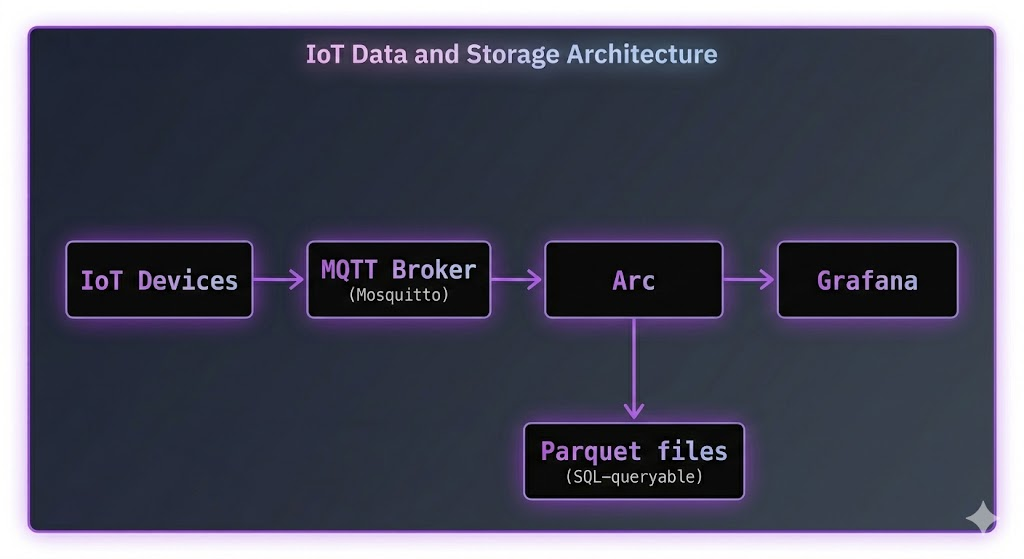
No Telegraf. No custom code. Arc subscribes to the broker like any other MQTT client, decodes the messages, and stores them.
Key things to know:
- Arc uses the Eclipse Paho MQTT client—works with any MQTT 3.1.1 broker (Mosquitto, EMQX, HiveMQ, VerneMQ, AWS IoT Core, Azure IoT Hub)
- Subscriptions are managed via REST API and persisted in SQLite—they survive restarts
- Auto-detects JSON and MessagePack message formats
- Supports QoS 0, 1, and 2
- TLS/SSL with client certificates for production
- Passwords encrypted at rest with AES-256-GCM
Prerequisites
- Arc running (v26.02.1 or higher)
- An MQTT broker (we'll use Mosquitto in this tutorial)
curlfor API callsmosquitto_pubfor sending test messages (comes with Mosquitto)
Step 1: Run the Stack with Docker Compose
The fastest way to get everything running. Create a docker-compose.yml:
version: '3.8'
services:
  arc:
    image: ghcr.io/basekick-labs/arc:latest
    ports:
      - "8000:8000"
    volumes:
      - arc-data:/data
    environment:
      ARC_MQTT_ENABLED: "true"
      ARC_AUTH_ENABLED: "true"
      ARC_ENCRYPTION_KEY: "${ARC_ENCRYPTION_KEY}"
    depends_on:
      - mosquitto

  mosquitto:
    image: eclipse-mosquitto:2
    ports:
      - "1883:1883"
    volumes:
      - ./mosquitto.conf:/mosquitto/config/mosquitto.conf

volumes:
  arc-data:
Create mosquitto.conf:
listener 1883
allow_anonymous true
Generate an encryption key (needed if your MQTT subscriptions use passwords—good practice to set it regardless):
export ARC_ENCRYPTION_KEY=$(openssl rand -base64 32)Start everything:
docker compose up -dGrab the Arc admin token:
docker logs arc 2>&1 | grep "Initial admin"Save it:
export ARC_TOKEN="arc_xxxxxxxxxxxxxxxxxxxxxxxxxxxxx"Step 2: Create an MQTT Subscription
This is the API call that tells Arc to connect to your broker and start listening. One curl command:
curl -X POST http://localhost:8000/api/v1/mqtt/subscriptions \
  -H "Content-Type: application/json" \
  -H "Authorization: Bearer $ARC_TOKEN" \
  -d '{
    "name": "factory-sensors",
    "broker": "tcp://mosquitto:1883",
    "topics": ["sensors/#"],
    "database": "iot",
    "qos": 1,
    "auto_start": true
  }'
That's it. Arc connects to the broker, subscribes to sensors/# (all topics under sensors/), and starts writing to the iot database. The auto_start: true means it will reconnect automatically after restarts.
You'll get back something like:
{
  "id": "sub_abc123",
  "name": "factory-sensors",
  "broker": "tcp://mosquitto:1883",
  "topics": ["sensors/#"],
  "database": "iot",
  "qos": 1,
  "status": "running",
  "auto_start": true,
  "created_at": "2026-03-12T10:00:00Z"
}
What each field does:
| Field | What it means |
|---|---|
name | Human-readable label—must be unique |
broker | MQTT broker URL. Supports tcp://, ssl://, ws://, wss:// |
topics | Array of topic patterns. + for single-level wildcard, # for multi-level |
database | Target Arc database—created automatically if it doesn't exist |
qos | 0 = fire-and-forget, 1 = at-least-once (recommended), 2 = exactly-once |
auto_start | Reconnect on Arc restart |
Step 3: Publish Some Sensor Data
Now send data to the broker. Your devices would do this, but let's simulate it with mosquitto_pub:
# Temperature reading
mosquitto_pub -h localhost -t "sensors/temperature" \
  -m '{"value": 23.5, "device_id": "sensor-001", "location": "warehouse-a"}'

# Humidity reading
mosquitto_pub -h localhost -t "sensors/humidity" \
  -m '{"value": 65.2, "device_id": "sensor-001", "location": "warehouse-a"}'

# Pressure reading
mosquitto_pub -h localhost -t "sensors/pressure" \
  -m '{"value": 1013.25, "device_id": "sensor-002", "location": "warehouse-b"}'
Notice: no time field in the payloads. Arc uses the current UTC time when the message arrives. If your devices include a timestamp field (time, timestamp, or t), Arc uses that instead—and auto-detects whether it's seconds, milliseconds, microseconds, or nanoseconds.
How topics become measurements: By default, the last segment of the topic becomes the measurement name in Arc. sensors/temperature → table temperature. sensors/humidity → table humidity. Simple.
Step 4: Query with SQL
Let's see the data:
# What tables were created?
curl -s -X POST http://localhost:8000/api/v1/query \
  -H "Authorization: Bearer $ARC_TOKEN" \
  -H "Content-Type: application/json" \
  -d '{"sql": "SHOW TABLES FROM iot"}'
You should see:
{
  "columns": ["name"],
  "data": [["temperature"], ["humidity"], ["pressure"]]
}
Now query the temperature readings:
curl -s -X POST http://localhost:8000/api/v1/query \
  -H "Authorization: Bearer $ARC_TOKEN" \
  -H "Content-Type: application/json" \
  -d '{
    "sql": "SELECT * FROM iot.temperature ORDER BY time DESC LIMIT 10"
  }'
Time-bucketed aggregation:
SELECT
  time_bucket(INTERVAL '5 minutes', time) as bucket,
  device_id,
  AVG(value) as avg_temp,
  MIN(value) as min_temp,
  MAX(value) as max_temp
FROM iot.temperature
WHERE time > NOW() - INTERVAL '1 hour'
GROUP BY bucket, device_id
ORDER BY bucket DESC
Cross-measurement join—correlate temperature with humidity from the same sensor:
SELECT
  t.time,
  t.device_id,
  t.value as temperature,
  h.value as humidity
FROM iot.temperature t
JOIN iot.humidity h
  ON t.time = h.time
  AND t.device_id = h.device_id
WHERE t.time > NOW() - INTERVAL '1 hour'
ORDER BY t.time DESC
Standard SQL. No proprietary query language. No special IoT syntax. Just SQL.
Topic Mapping: Extract Tags from Topic Paths
The default behavior—last topic segment becomes the measurement—works for simple setups. But IoT topic hierarchies often encode metadata in the path:
factory/line-1/machine-007/metrics
factory/line-2/machine-012/metrics
You want line and machine_id as tags in Arc, not lost in the topic string. Topic mapping handles this:
curl -X POST http://localhost:8000/api/v1/mqtt/subscriptions \
  -H "Content-Type: application/json" \
  -H "Authorization: Bearer $ARC_TOKEN" \
  -d '{
    "name": "factory-floor",
    "broker": "tcp://mosquitto:1883",
    "topics": ["factory/+/+/metrics"],
    "database": "manufacturing",
    "qos": 2,
    "topic_mapping": {
      "factory/+/+/metrics": {
        "measurement": "machine_metrics",
        "tags_from_topic": [
          {"position": 1, "tag_name": "line"},
          {"position": 2, "tag_name": "machine_id"}
        ]
      }
    }
  }'
A message published to factory/line-1/machine-007/metrics with payload {"rpm": 3200, "temperature": 85.3} gets stored as:
- Database:
manufacturing - Measurement:
machine_metrics - Tags:
line=line-1,machine_id=machine-007 - Fields:
rpm=3200,temperature=85.3
Now you can query by line or machine without parsing topic strings:
SELECT
  time_bucket(INTERVAL '5 minutes', time) as bucket,
  line,
  machine_id,
  AVG(rpm) as avg_rpm,
  MAX(temperature) as max_temp
FROM manufacturing.machine_metrics
WHERE time > NOW() - INTERVAL '1 hour'
  AND line = 'line-1'
GROUP BY bucket, line, machine_id
ORDER BY bucket DESC
Managing Subscriptions at Runtime
Everything is API-driven. No config files to edit, no restarts needed.
List all subscriptions
curl -s http://localhost:8000/api/v1/mqtt/subscriptions \
  -H "Authorization: Bearer $ARC_TOKEN" | python3 -m json.tool
Stop a subscription
curl -X POST http://localhost:8000/api/v1/mqtt/subscriptions/{id}/stop \
  -H "Authorization: Bearer $ARC_TOKEN"
Update (must be stopped first)
curl -X PUT http://localhost:8000/api/v1/mqtt/subscriptions/{id} \
  -H "Content-Type: application/json" \
  -H "Authorization: Bearer $ARC_TOKEN" \
  -d '{
    "topics": ["sensors/#", "alerts/#"],
    "qos": 2
  }'
Restart
curl -X POST http://localhost:8000/api/v1/mqtt/subscriptions/{id}/restart \
  -H "Authorization: Bearer $ARC_TOKEN"
Delete
curl -X DELETE http://localhost:8000/api/v1/mqtt/subscriptions/{id} \
  -H "Authorization: Bearer $ARC_TOKEN"
Monitoring
Subscription stats
curl -s http://localhost:8000/api/v1/mqtt/subscriptions/{id}/stats \
  -H "Authorization: Bearer $ARC_TOKEN"
Returns:
{
  "messages_received": 15420,
  "bytes_received": 2458320,
  "decode_errors": 0,
  "last_message_at": "2026-03-12T10:30:15Z",
  "topics": {
    "sensors/temperature": 8500,
    "sensors/humidity": 6920
  }
}
Health check (no auth required)
curl -s http://localhost:8000/api/v1/mqtt/health{
"status": "healthy",
"healthy": true,
"running_count": 2,
"connected_count": 2,
"disconnected_count": 0
}Prometheus metrics
Arc exposes MQTT metrics at its Prometheus endpoint:
| Metric | Description |
|---|---|
arc_mqtt_messages_received_total | Total messages received |
arc_mqtt_bytes_received_total | Total bytes received |
arc_mqtt_decode_errors_total | Failed decodes |
arc_mqtt_connected | Connection status (1/0) |
arc_mqtt_reconnects_total | Reconnection attempts |
Set up Grafana alerts on arc_mqtt_connected == 0 to catch disconnections.
Multiple Brokers
One Arc instance can connect to as many brokers as you need. Different environments, different vendors, different facilities:
# Production broker with TLS
curl -X POST http://localhost:8000/api/v1/mqtt/subscriptions \
  -H "Content-Type: application/json" \
  -H "Authorization: Bearer $ARC_TOKEN" \
  -d '{
    "name": "production-sensors",
    "broker": "ssl://prod-mqtt.example.com:8883",
    "topics": ["prod/#"],
    "database": "production",
    "tls_enabled": true,
    "tls_ca_path": "/etc/arc/certs/ca.crt",
    "username": "arc_prod",
    "password": "your-secure-password"
  }'

# Development broker — no auth, no TLS
curl -X POST http://localhost:8000/api/v1/mqtt/subscriptions \
  -H "Content-Type: application/json" \
  -H "Authorization: Bearer $ARC_TOKEN" \
  -d '{
    "name": "dev-sensors",
    "broker": "tcp://dev-mqtt.example.com:1883",
    "topics": ["dev/#"],
    "database": "development"
  }'
Each subscription is independent—its own connection, its own reconnect logic, its own database. One broker going down doesn't affect the others.
TLS and Authentication
For production, you'll want TLS and proper credentials.
Server certificate verification
curl -X POST http://localhost:8000/api/v1/mqtt/subscriptions \
  -H "Content-Type: application/json" \
  -H "Authorization: Bearer $ARC_TOKEN" \
  -d '{
    "name": "secure-broker",
    "broker": "ssl://broker.example.com:8883",
    "topics": ["secure/#"],
    "database": "production",
    "tls_enabled": true,
    "tls_ca_path": "/etc/arc/certs/ca.crt"
  }'
Mutual TLS (client certificates)
curl -X POST http://localhost:8000/api/v1/mqtt/subscriptions \
  -H "Content-Type: application/json" \
  -H "Authorization: Bearer $ARC_TOKEN" \
  -d '{
    "name": "mtls-broker",
    "broker": "ssl://broker.example.com:8883",
    "topics": ["secure/#"],
    "database": "production",
    "tls_enabled": true,
    "tls_cert_path": "/etc/arc/certs/client.crt",
    "tls_key_path": "/etc/arc/certs/client.key",
    "tls_ca_path": "/etc/arc/certs/ca.crt"
  }'
Password encryption
Passwords are encrypted at rest using AES-256-GCM. You set the encryption key once:
# Generate a key
openssl rand -base64 32

# Set it before starting Arc
export ARC_ENCRYPTION_KEY="your-base64-encoded-32-byte-key"
Subscriptions without passwords work fine without the key.
Message Formats
Arc auto-detects the format. Your devices don't need to change anything.
JSON (single record)
{"time": 1706745600000000, "temperature": 23.5, "humidity": 65.2, "device_id": "sensor-001"}JSON (batch)
[
  {"time": 1706745600000000, "temperature": 23.5},
  {"time": 1706745601000000, "temperature": 23.6},
  {"time": 1706745602000000, "temperature": 23.4}
]
MessagePack
Same structures as JSON but MessagePack-encoded. Detected automatically via magic bytes. Use this for higher throughput—~6M records/sec with the columnar format.
Timestamp handling
- If
time,timestamp, ortfield is present: auto-detects precision (seconds, milliseconds, microseconds, nanoseconds) based on magnitude - If no timestamp field: current UTC time is used
Troubleshooting
Subscription stuck in "error" status?
curl -s http://localhost:8000/api/v1/mqtt/subscriptions/{id} \
  -H "Authorization: Bearer $ARC_TOKEN" | python3 -m json.tool
Check the error_message field. Common causes:
- Broker URL wrong (missing
tcp://prefix) - Broker unreachable from Arc's network
- Another client using the same
client_id - Bad credentials
Messages received but no data in queries?
Check decode errors in stats:
curl -s http://localhost:8000/api/v1/mqtt/subscriptions/{id}/stats \
  -H "Authorization: Bearer $ARC_TOKEN" | python3 -m json.tool
If decode_errors is climbing, your messages aren't valid JSON or MessagePack. Test with a simple payload first:
mosquitto_pub -h localhost -t "test/data" -m '{"value": 42}'Subscription won't start after restart?
Make sure auto_start is true on the subscription and ARC_MQTT_ENABLED=true in your environment.
Conclusion
No Telegraf. No Node-RED. No custom bridge scripts. Arc connects directly to your MQTT broker, decodes the messages, and stores them in Parquet.
- Create a subscription: one API call
- Manage at runtime: start, stop, update, delete—no restarts
- Multiple brokers: connect to as many as you need
- Topic mapping: extract tags from topic hierarchies
- Query with SQL: standard DuckDB SQL, joins, aggregations, window functions
- Monitor everything: per-subscription stats, health checks, Prometheus metrics
If you're running Telegraf today purely as an MQTT bridge to Arc, you can remove it. If you're running Node-RED or a custom script, you can definitely remove it.
Resources: