
Your data is in Arc. Your thinking happens in Claude. The gap between them is copying SQL results into a chat window and hoping the context fits.
We built arc-mcp to close that gap: an open-source MCP server that connects Claude Desktop, Claude Code, Cursor, and any MCP-compatible LLM directly to your Arc instance. You ask a question in plain English, the model figures out the right SQL, runs it against your data, and hands you the answer. No query writing required.
This post walks through what arc-mcp does, how to install it, and how to wire it up to Claude Desktop — the fastest path from "I have data in Arc" to "I'm having a conversation with it."
What arc-mcp Does
arc-mcp exposes five tools to the LLM:
| Tool | What it does |
|---|---|
list_databases | Lists all databases in your Arc instance |
list_measurements | Lists measurements (tables) in a database |
describe_measurement | Returns column names, types, row count, and time range |
query | Runs a read-only SQL query (DuckDB dialect) |
get_sample_data | Fetches recent rows from a measurement |
The model uses these tools the way a developer would use a SQL client: explore the schema first, then query. The difference is you describe what you want in plain English and the model does the rest.
It's read-only by design. Write operations (INSERT, UPDATE, DELETE, DROP, ALTER) are blocked before they ever reach Arc. Arc's own server-side guards are the authoritative defense; arc-mcp adds a second advisory layer.
Installation
Option 1 — Go install (fastest for local use)
If you have Go installed:
go install github.com/basekick-labs/arc-mcp/cmd/arc-mcp@latestThe binary lands in your $GOPATH/bin. Verify it works:
arc-mcp --versionOption 2 — Download a binary
Grab the latest release from GitHub Releases. Binaries are available for Linux, macOS, and Windows (amd64 and arm64). Each release includes a checksums.txt — verify before running:
shasum -a 256 -c checksums.txtOption 3 — Docker Compose (Arc + MCP together)
The fastest way to try arc-mcp if you don't have Arc running yet is Docker Compose. The docker-compose.yml in the arc-mcp repo brings up Arc and arc-mcp together, exposing MCP over HTTP/SSE on port 8080.
git clone https://github.com/Basekick-Labs/arc-mcp.git
cd arc-mcp
cp .env.example .env
# Edit .env — set ARC_TOKEN to any string you want as your API token
docker compose --profile with-arc up
After a few seconds:
- Arc API is available at
http://localhost:8000 - MCP over SSE is available at
http://localhost:8080/sse
The compose file uses two services. Arc runs as a standalone container with a health check, and arc-mcp runs as a gateway (arc-mcp wrapped by supergateway) that translates the stdio MCP protocol to HTTP/SSE so remote clients can connect:
services:
  arc:
    image: ghcr.io/basekick-labs/arc:latest
    profiles: ["with-arc"]
    ports:
      - "8000:8000"
    volumes:
      - arc-data:/app/data
    healthcheck:
      test: ["CMD", "curl", "-f", "http://localhost:8000/health"]
      interval: 10s
      retries: 10

  arc-mcp:
    image: ghcr.io/basekick-labs/arc-mcp-gateway:26.04.2
    environment:
      ARC_URL: http://arc:8000
      ARC_TOKEN: ${ARC_TOKEN}
    ports:
      - "8080:8080"
    depends_on:
      arc:
        condition: service_healthy
        required: false
If you already run Arc somewhere, skip the --profile with-arc flag and just set ARC_URL and ARC_TOKEN in .env:
docker compose up arc-mcpConnecting Claude Desktop
Claude Desktop supports MCP servers through its config file. There are two ways to connect depending on how arc-mcp is running.
Connecting to a local binary (stdio)
If you installed arc-mcp with go install or downloaded a binary, Claude Desktop spawns the process directly over stdio. Add this to ~/Library/Application Support/Claude/claude_desktop_config.json on macOS (or %APPDATA%\Claude\claude_desktop_config.json on Windows):
{
  "mcpServers": {
    "arc": {
      "command": "arc-mcp",
      "args": [
        "--arc-url", "http://localhost:8000",
        "--arc-token", "your-token-here"
      ]
    }
  }
}
Restart Claude Desktop. You should see the arc-mcp tools appear in the tools panel.
Connecting to a remote gateway (HTTP/SSE)
If you're running arc-mcp via Docker Compose (or deployed on a server), use mcp-remote to bridge Claude Desktop's stdio to the SSE endpoint:
{
  "mcpServers": {
    "arc": {
      "command": "node",
      "args": [
        "/path/to/mcp-remote/dist/proxy.js",
        "https://your-arc-mcp-host/sse"
      ]
    }
  }
}
Install mcp-remote once with npm install -g mcp-remote. This is the approach we use for our own hosted Arc instances — arc-mcp runs in a container on a server, and Claude Desktop connects over HTTPS.
Connecting Claude Code
Add to your project's .claude/settings.json or global ~/.claude/settings.json:
{
  "mcpServers": {
    "arc": {
      "command": "arc-mcp",
      "args": ["--arc-url", "http://localhost:8000", "--arc-token", "your-token"]
    }
  }
}
What it Looks Like in Practice
Once connected, you talk to your data. Here are real examples from our own Arc instance — a demo setup with several databases covering different domains.
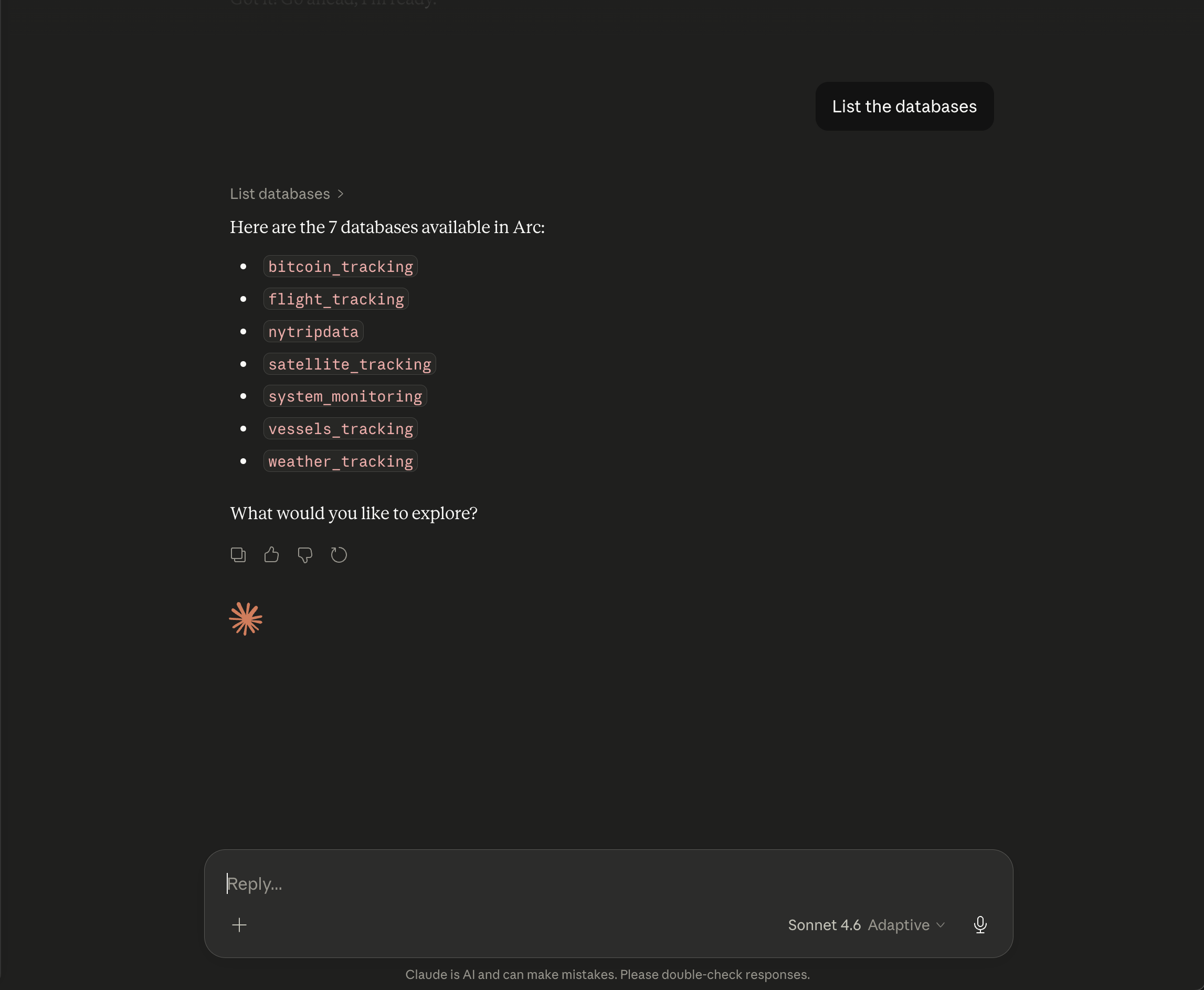
Exploring what's available:
"List the databases"
The model calls list_databases and surfaces everything at once: bitcoin_tracking, flight_tracking, nytripdata, satellite_tracking, system_monitoring, vessels_tracking, weather_tracking. Seven databases, zero SQL.
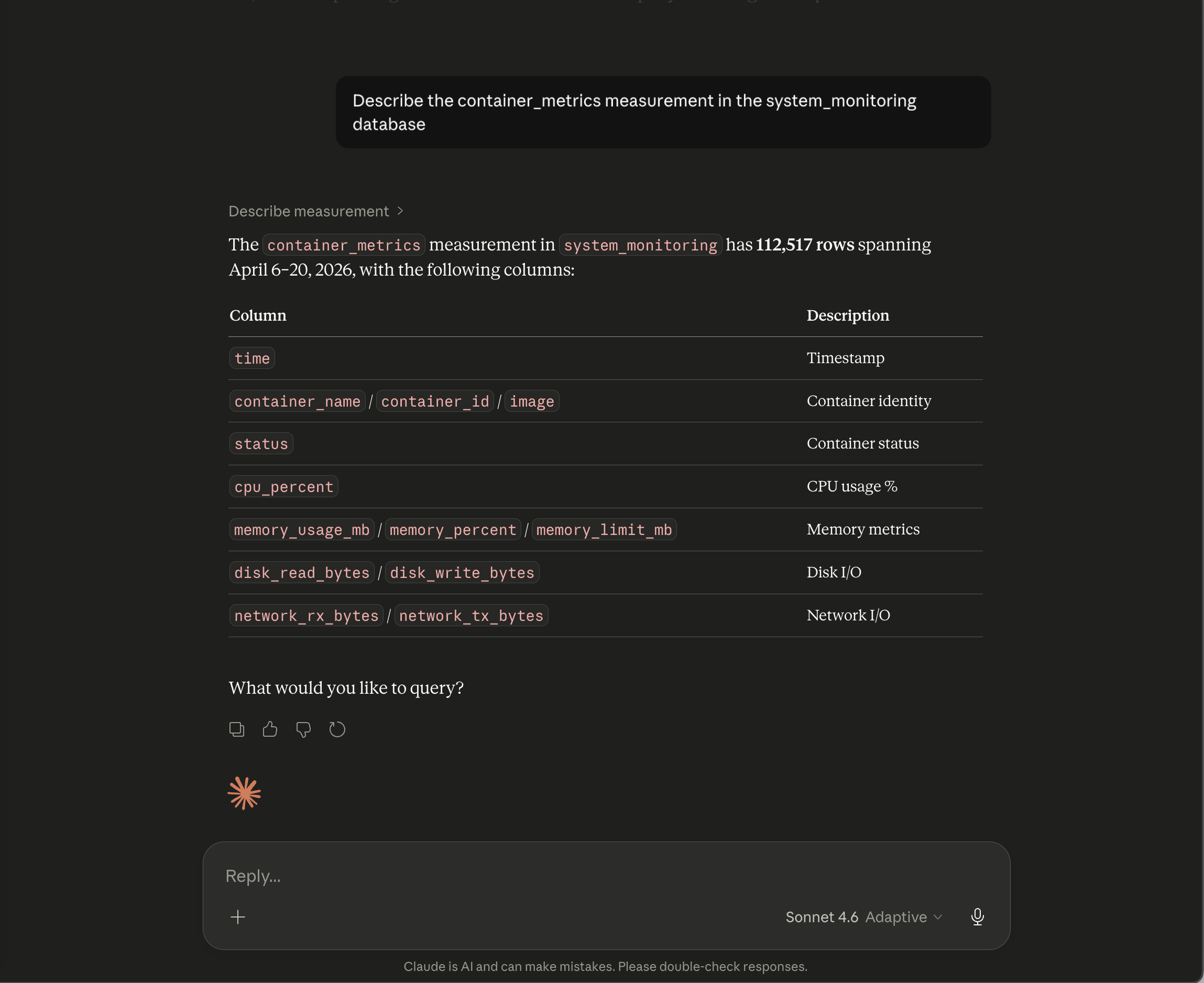
Understanding a measurement:
"Describe the container_metrics measurement in the system_monitoring database"
describe_measurement returns column names, types, row count, and time range. Here it shows 112,517 rows with columns for container identity, CPU percent, memory, disk I/O, and network I/O — everything you'd want before writing a query.
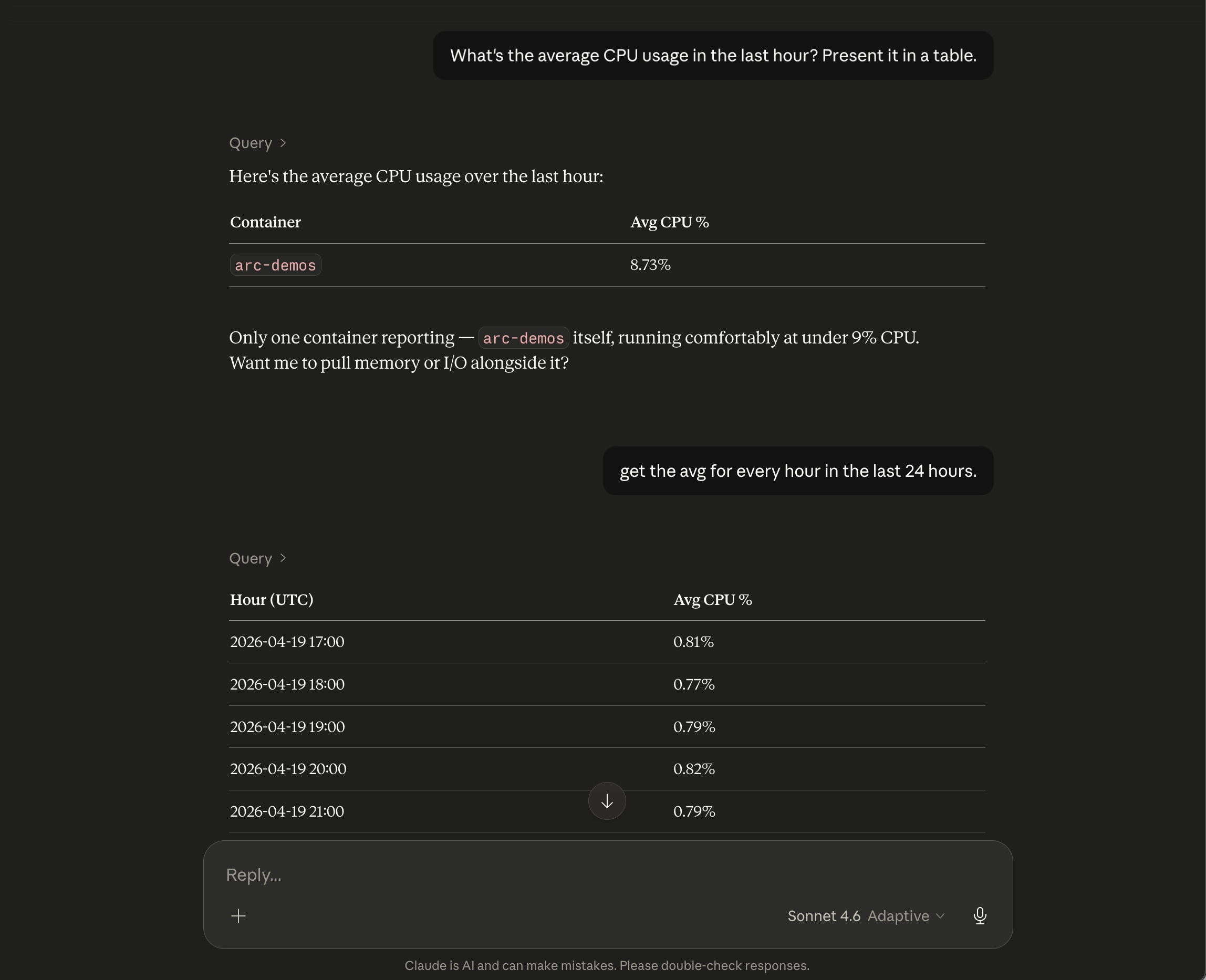
Asking a real question — and following up:
"What's the average CPU usage in the last hour? Present it in a table."
The model writes the SQL, calls query, and returns a clean table. One container: arc-demos, running comfortably at 8.73%. It then adds context — "only one container reporting, running at under 9% CPU" — and asks if you want memory or I/O alongside it.
You say: "get the avg for every hour in the last 24 hours."
It issues a new query without prompting, breaking down hourly CPU averages across the full day.
Getting recent samples:
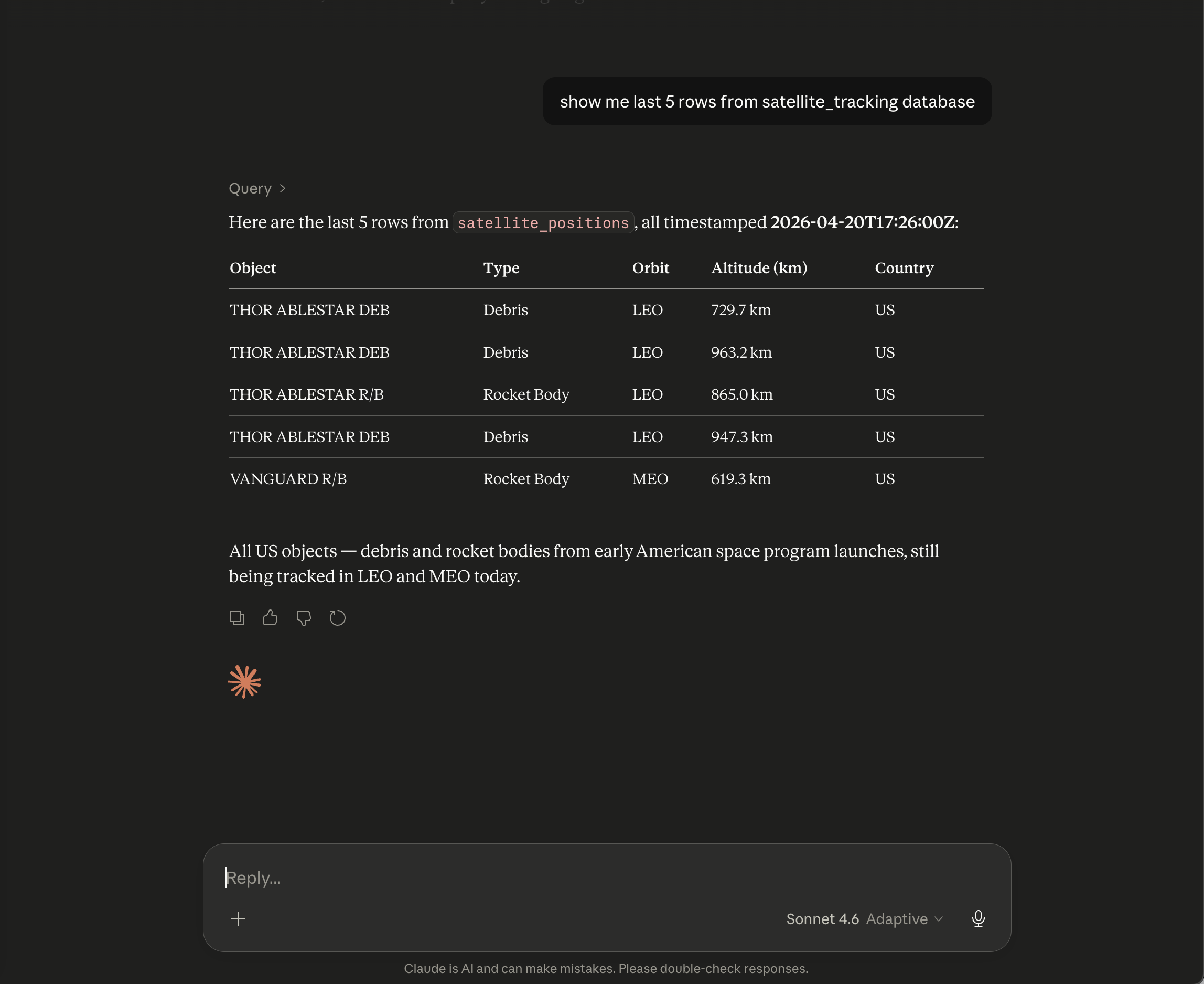
"Show me the last 5 rows from the satellite_tracking database"
get_sample_data fetches recent rows ordered by time descending. Here it pulls from satellite_positions: THOR ABLESTAR debris and VANGUARD rocket bodies in LEO and MEO, all timestamped to the second. Claude adds a note — "all US objects, debris and rocket bodies from early American space program launches, still being tracked today."
Actual analysis, not just data retrieval:
"Analyze the New York Citi Bike dataset to detect anomalies between February 2025 and 2026."
This is where it gets interesting. The model queries nytripdata, spots a 40x difference between February 2025 (30,196 trips) and February 2026 (1,219,706 trips), and immediately flags it — not as a real trend, but as incomplete ingestion. It cross-references the rest of the dataset, notes that every other month sits between 120K and 1M trips, and concludes that only a partial batch was loaded for February 2025.
"This is exactly the kind of anomaly that goes undetected in static dashboards but surfaces immediately when you query across time with the right questions."
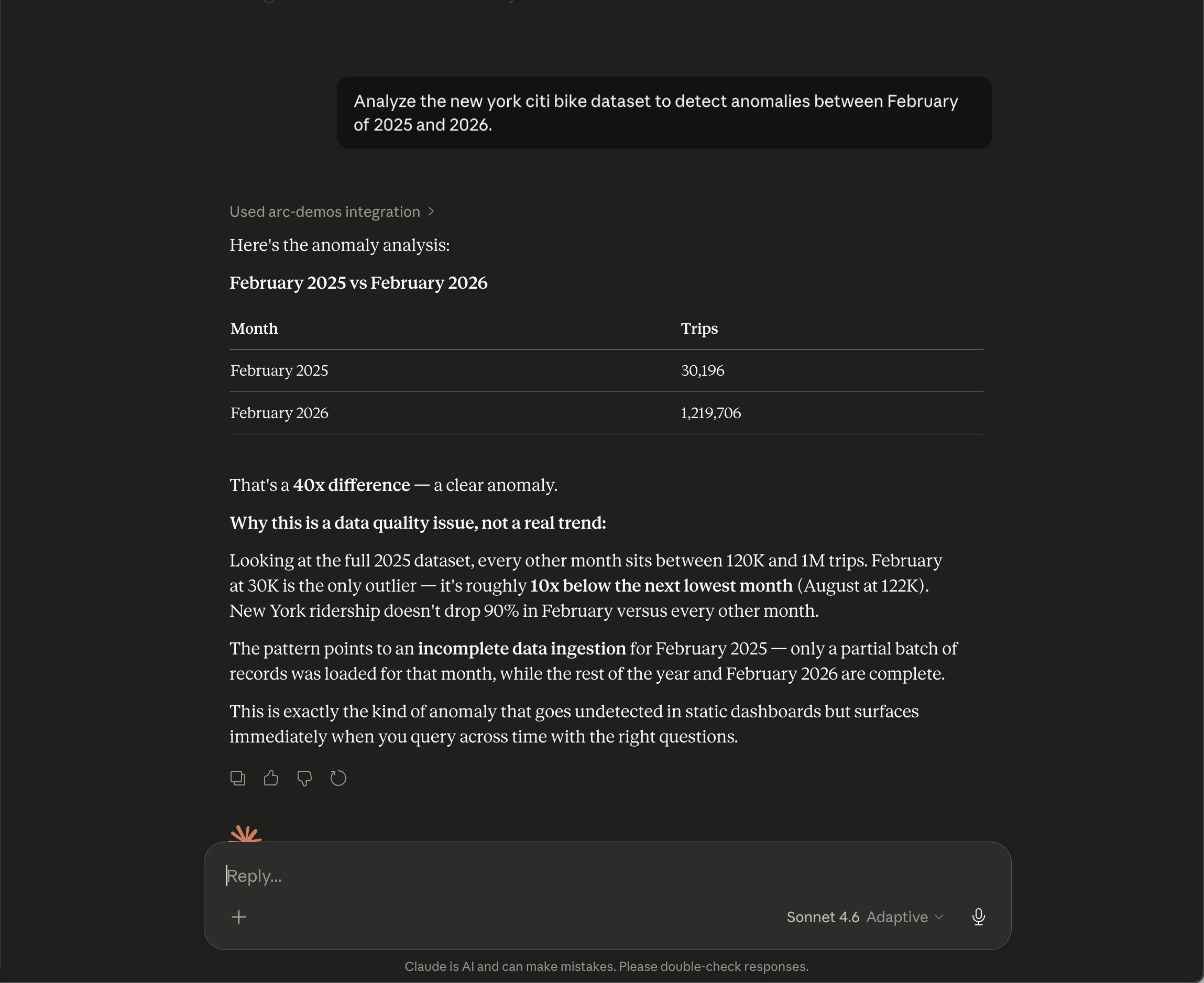
That last example shows the real value. It's not just running SQL — it's reasoning about the results. The model knows what "normal" looks like across the dataset and catches the outlier you would have missed.
Security
A few things worth knowing before you deploy:
Read-only enforcement. arc-mcp blocks write operations (INSERT, UPDATE, DELETE, DROP, ALTER, CREATE, ATTACH) before they reach Arc. This is a defense-in-depth layer — Arc's own server-side guards are authoritative. If you've configured Arc with a read-only token, arc-mcp adds a redundant second check.
Token over HTTP. arc-mcp refuses to send your Bearer token over plaintext HTTP to a non-loopback host. If you point it at a remote http:// URL with a token, it won't start. Use HTTPS for remote Arc instances, or pass --insecure if you're on an isolated internal network and understand the tradeoff.
Token file. To avoid your token appearing in ps aux, use ARC_TOKEN_FILE instead of the --arc-token flag or ARC_TOKEN env var:
echo "your-token" > ~/.arc-token
chmod 600 ~/.arc-token
ARC_TOKEN_FILE=~/.arc-token arc-mcp --arc-url http://localhost:8000
Public exposure. MCP has no built-in authentication. If you expose arc-mcp to the internet without a gateway that handles auth, anyone who reaches the endpoint can query your Arc data. For public deployments, put arc-mcp behind a reverse proxy (Traefik, nginx, Caddy) with authentication, or restrict access at the network layer. We use Tailscale for our own instances — the SSE endpoint is only reachable from devices on our tailnet.
Multiple Arc Instances
You can connect multiple Arc instances to Claude Desktop simultaneously. Each gets its own MCP server entry with a different name:
{
  "mcpServers": {
    "arc-production": {
      "command": "node",
      "args": ["/path/to/mcp-remote/dist/proxy.js", "https://arc-mcp.example.com/sse"]
    },
    "arc-staging": {
      "command": "node",
      "args": ["/path/to/mcp-remote/dist/proxy.js", "https://arc-mcp-staging.example.com/sse"]
    }
  }
}
The model sees both and can query either. When you ask "compare CPU usage between production and staging," it issues queries against both databases and presents a combined answer.
What's Next
arc-mcp is open source under the MIT license. The current release is v26.04.2.
We're actively working on:
- MCP authentication — token passthrough and OAuth 2.0 so you can expose arc-mcp publicly with per-user access control
- Read-only Arc tokens — a dedicated token scope in Arc that's scoped to SELECT-only, so arc-mcp can't write even if the advisory layer is bypassed
- Cursor and Windsurf support — both are MCP-compatible and work with the same config
If you try it and hit something unexpected, open an issue. And if you build something interesting on top of it, we'd love to hear about it.
arc-mcp is available at github.com/Basekick-Labs/arc-mcp. Arc is available at github.com/Basekick-Labs/arc.