
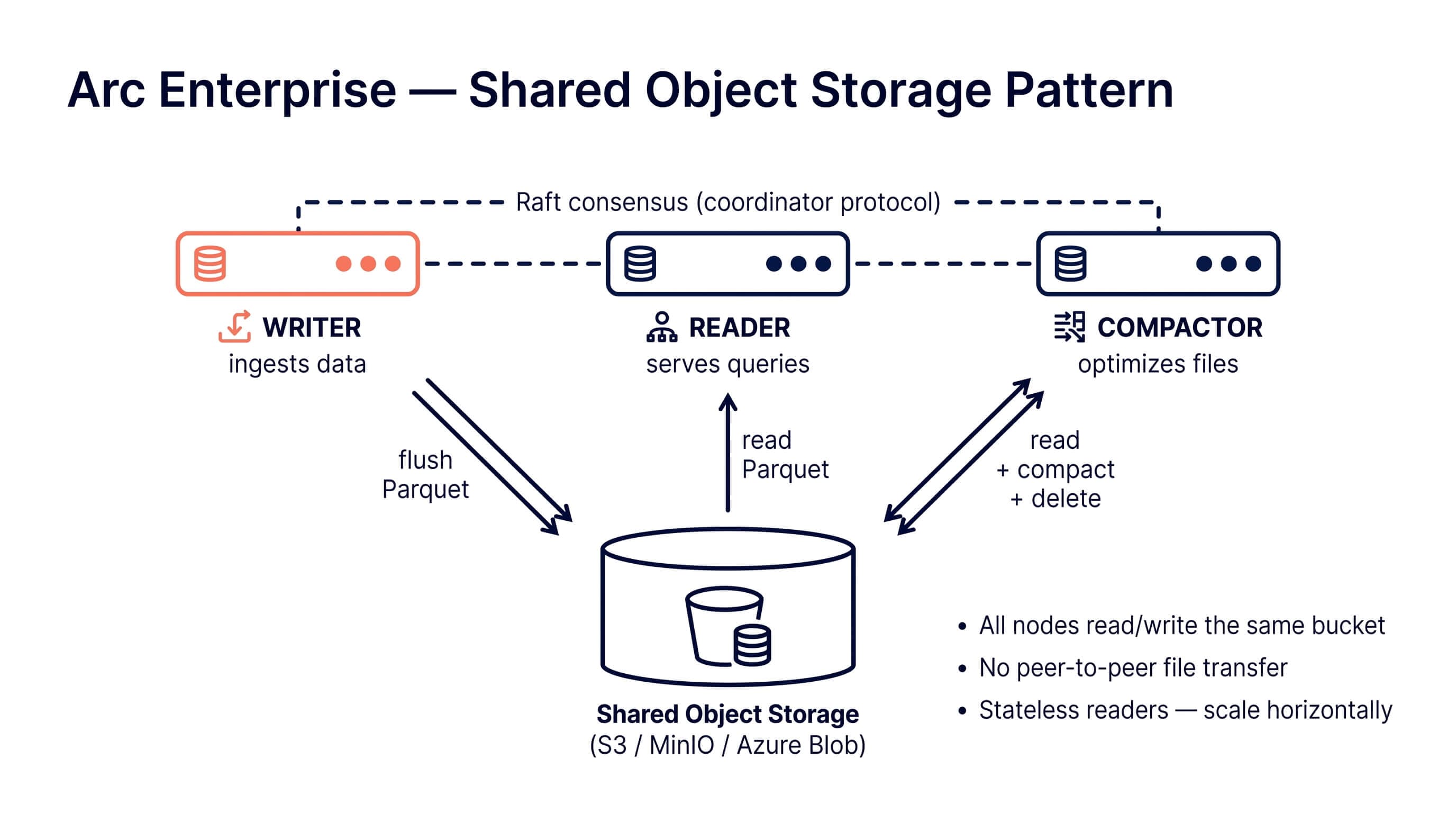
There's a question that comes up almost every time someone evaluates Arc Enterprise: "Where do the Parquet files live?"
It's a good question. The answer shapes durability, query latency, what your AWS bill looks like, and how the cluster behaves when a node dies at 3am. Arc Enterprise gives you two answers, and they're genuinely different. Not "two configurations of the same thing", but two operating models with different consistency properties, different failure modes, and (this matters) different shopping lists.
Let me walk through both.
The Two Patterns
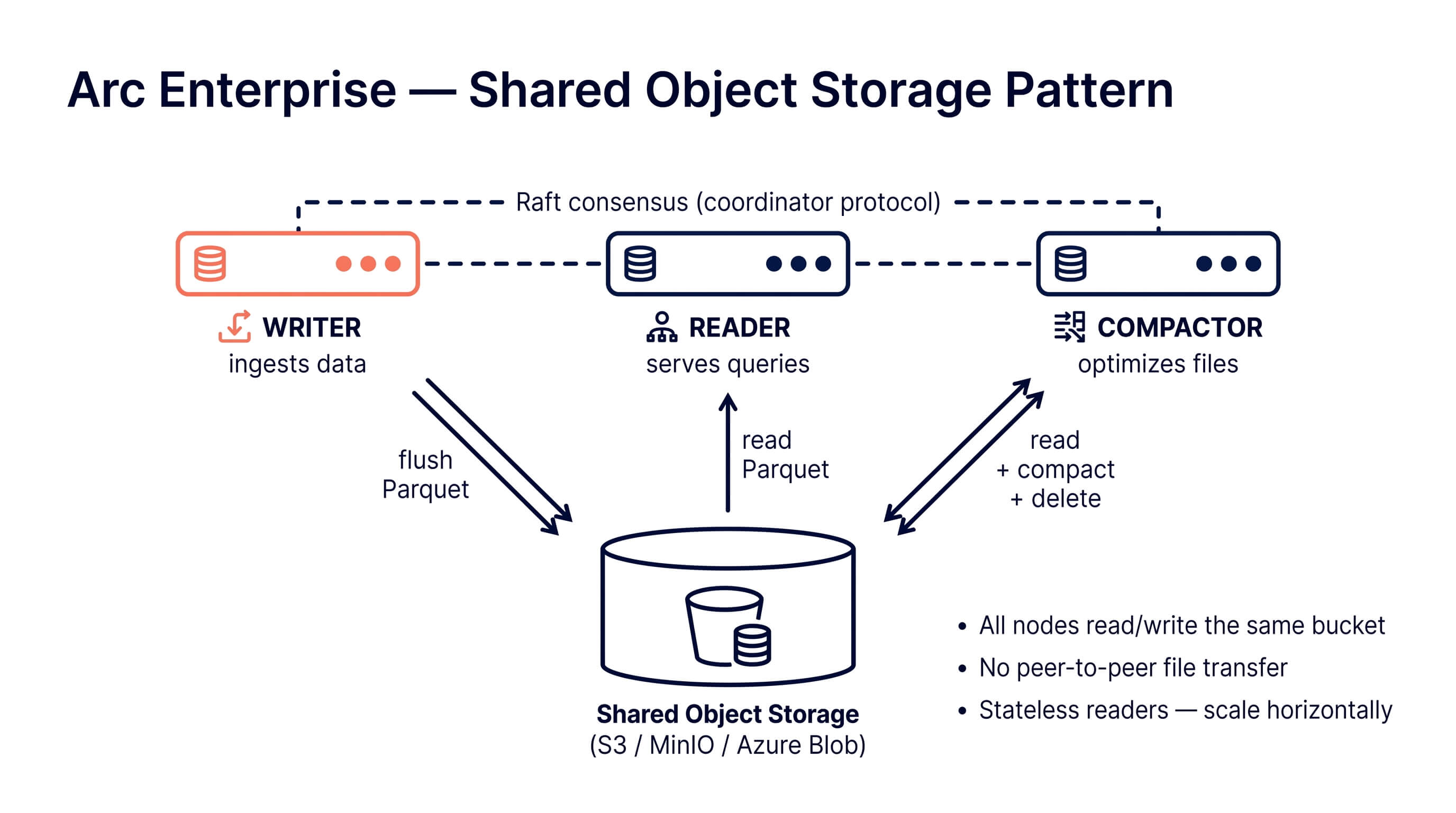
Shared object storage. All cluster nodes read and write the same bucket. Could be AWS S3, Google Cloud Storage, Azure Blob, MinIO, R2, anything that speaks the S3 API. The bucket is the source of truth. Nodes are stateless from a data perspective: kill a reader, spin up a new one, it sees the same files.
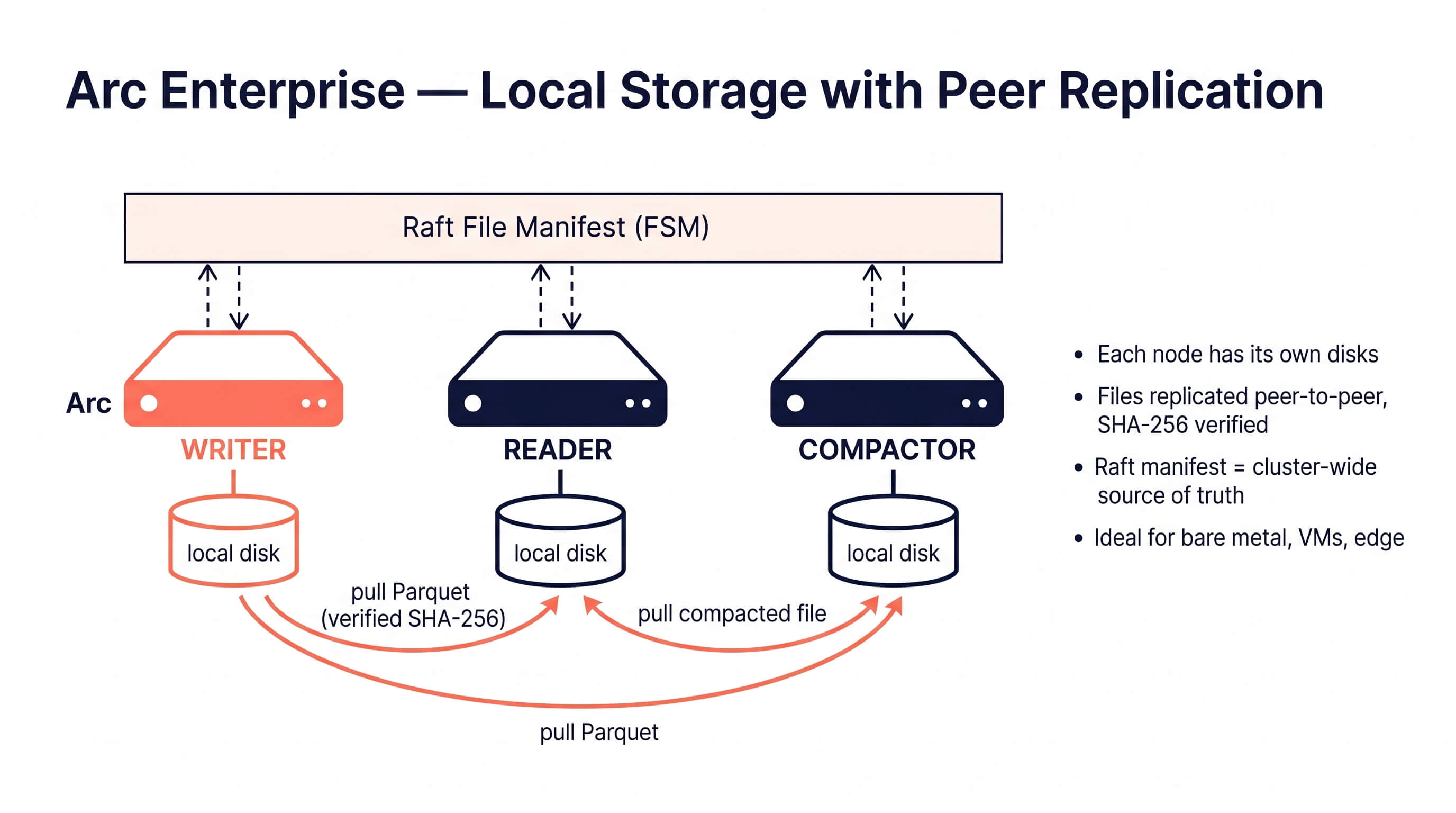
Local storage with peer replication. Each node has its own local disks. When a writer flushes a Parquet file, all other nodes pull the bytes from the writer (or any healthy peer that already has a copy) and store them locally. A Raft-replicated manifest tracks which files exist cluster-wide, with SHA-256 hashes for verification. There is no bucket. The cluster is the durability boundary. (This is the peer file replication feature that shipped with 26.05.1.)
These are not "small cluster vs. big cluster." They're different architectures, and the right one depends mostly on whether you have shared object storage available and whether you care about query latency more than ergonomics.
Pattern A: Shared Object Storage
This is the cloud-native pattern. If you're on AWS, GCP, or Azure, this is probably what you want.
How it works
Every node points at the same bucket. Writers write Parquet files into the bucket. Readers query Parquet files from the bucket. Compaction reads N small files from the bucket and writes one big file back. The bucket is the cluster's filesystem.
Nodes don't replicate data to each other because they don't need to. The data is already in one durable place that all of them can see.
The compactor still has to be a single node (running compaction on three nodes against the same bucket gives you three sets of duplicate compaction outputs, which is exactly as fun as it sounds), but that's about exclusivity, not replication. Arc Enterprise handles this with a Raft-leased compactor role and automatic failover. If the compactor dies, another node picks up the lease in about 30 seconds.
What changes operationally
- Readers are elastic. Need more query capacity at 9am? Scale to four readers. They cold-start in seconds because there's nothing to copy.
- Writers carry only their WAL. The PVC on a writer pod stays small (default 20Gi in shared mode) because the Parquet files don't live there.
- Bucket access is the bottleneck. Query latency is whatever your object-store latency is, plus DuckDB. On S3 that's fine for analytical queries; it is not fine if you want sub-millisecond reads.
The Helm side
The helm/arc-enterprise/ chart ships a preset for this:
helm install arc ./helm/arc-enterprise \
  -f ./helm/arc-enterprise/values-shared-storage.yaml \
  --set storage.shared.s3.bucket=my-arc-data \
  --set auth.bootstrapToken.value=my-token \
  --set cluster.sharedSecret.value=my-cluster-secret
Key values:
storage:
  mode: shared

writer:
  replicas: 1            # 3 for HA; 2 is a Raft split-brain hazard, the chart will refuse it
  persistence:
    size: 20Gi           # WAL only

reader:
  replicas: 2            # bump as needed
  persistence:
    enabled: false       # emptyDir; no Parquet files live here

compactor:
  enabled: true
  replicas: 1            # exactly one. always one.

cluster:
  replication:
    enabled: false       # no peer replication needed; the bucket is shared
The chart bundles MinIO as an option if you want a self-contained "S3 in a pod" setup for testing or for shops that want object storage but don't have an external one. For production you'll usually point at real S3 or Azure Blob and disable the bundled MinIO.
Pattern B: Local Storage with Peer Replication
This is the pattern for environments where shared object storage isn't available or isn't the right answer. Bare metal. Edge sites. Air-gapped networks. Aerospace gateways. Places where latency matters and S3 either doesn't exist or costs more than the hardware.
How it works
Each node has its own local disks (NVMe, ideally). When a writer flushes a Parquet file:
- It writes the file locally and computes a SHA-256 hash.
- It commits a manifest entry into Raft: "this file exists, this is its hash, I (writer-0) wrote it."
- Every other node sees the manifest entry through the Raft FSM and queues a fetch.
- A puller goroutine on each node opens a connection to the writer (or any peer that already has the file), streams the bytes, verifies the SHA-256, and writes the file to its own local storage.
That's the steady state. The interesting parts are what happens around the edges.
Resumable transfers. If a pull is interrupted halfway through (flaky link, node restart, network partition), the puller checks how many bytes are already on disk, hashes the prefix, and asks the peer for only the remaining tail. The full-file SHA-256 verification still runs after the resume completes, so you can't end up with a silently corrupted file.
Restart catch-up. When a node starts up, it walks the Raft manifest, compares it against its local storage, and pulls anything it's missing. The original writer doesn't have to be alive for this to work. As long as some peer has the file, the new node can pull from it. This is the property that makes the system safe under rolling restarts.
Reader query freshness. Readers also receive the writer's WAL stream and apply it to their in-memory buffer, so unflushed data is queryable on readers within milliseconds, not seconds. This is why "spin up a reader purely for analytics queries" works without a noticeable freshness lag.
What changes operationally
- Query latency is local NVMe latency. Sub-millisecond reads on hot data, because the data is on the same machine as the query engine.
- Disk planning matters. Each node needs enough disk for its share of the data. The default 50Gi PVC is a starting point, not a guarantee.
- Network capacity matters. Replication runs over your cluster network. On a 10GbE link with default settings (4 pull workers, 60s fetch timeout) you can saturate the link if you ingest aggressively.
- You don't pay S3 per-request charges. This sounds small until you realize a busy compaction can issue hundreds of thousands of HEAD/GET requests per day.
The Helm side
helm install arc ./helm/arc-enterprise \
  -f ./helm/arc-enterprise/values-local-storage.yaml \
  --set auth.bootstrapToken.value=my-token \
  --set cluster.sharedSecret.value=my-cluster-secret
Key values:
storage:
  mode: local

writer:
  replicas: 1
  persistence:
    size: 50Gi           # WAL + Parquet files both live here

reader:
  replicas: 2
  persistence:
    enabled: true
    size: 50Gi           # full Parquet copy, replicated from writer

compactor:
  enabled: true
  replicas: 1
  persistence:
    size: 50Gi           # Parquet + scratch

cluster:
  replication:
    enabled: true        # required in local mode
    pullWorkers: 4
    fetchTimeoutMs: 60000
    serveTimeoutMs: 120000
    catchup:
      enabled: true
      barrierTimeoutMs: 10000
The chart will refuse to install local mode without cluster.replication.enabled=true, because a local-storage cluster without peer replication is just three nodes that don't agree about anything, which is a creative way to lose data.
Choosing
Here's the actual decision tree, no marketing voice:
Pick shared storage if: you're on AWS / GCP / Azure, you already pay for S3 / GCS / Blob, you want elastic readers, you want the simplest possible storage story, your queries don't need single-digit-millisecond latency.
Pick local storage if: you're on bare metal or VMs with fast local disks, you're at the edge or air-gapped, your S3 bill is a problem, you need the lowest possible query latency, your network between nodes is fast (10GbE+).
A few places people get this wrong:
- "We'll just use NFS as 'local' storage." No. NFS gives you neither the durability of real shared object storage nor the latency of real local disks. You'll get the worst of both. The chart can't actually tell you're doing this; it'll just deploy and you'll wonder why everything is slow and occasionally inconsistent.
- "We'll run a compactor on every node." On shared storage this gives you duplicate compaction outputs. On local storage it works but wastes CPU. The chart defaults to one compactor for a reason.
- "We'll mix shared and local in one cluster." Don't. The cluster manifest assumes one storage backend. There is no migration path that doesn't involve downtime.
Failover, briefly
Both patterns share the same failure model for cluster roles:
- Writer failover. With
cluster.failover.enabled=true, if the active writer becomes unreachable for ~15s (three missed heartbeats), the Raft leader promotes another writer-eligible node. New writes resume on the new writer; existing readers and the compactor reconfigure automatically. - Compactor failover. Same mechanism, ~30s threshold, 60s cooldown to prevent flapping. The new compactor picks up where the old one left off via the completion-manifest bridge (so a half-finished compaction doesn't get re-run from scratch).
- Reader loss. Doesn't require failover. Just remove the dead reader from the cluster (
DELETE /api/v1/cluster/nodes/:id) and the remaining readers keep serving queries.
The difference between patterns is what happens to the data, not the roles. On shared storage the bucket already has the data, so a new node joins with nothing to copy. On local storage the new node walks the Raft manifest at startup and pulls everything it's missing from healthy peers before serving traffic.
What we use ourselves
We run both patterns in production for our own services and for customer deployments. The split is roughly:
- Cloud customers, including the multi-tenant Arc Cloud control plane: shared storage with S3 plus prefix-based tenant isolation.
- Aerospace, defense, and edge customers: local storage with peer replication, often on bare metal with NVMe.
Same binary. Same cluster protocol. Same Raft. Different storage.mode and a different PVC size.
If you're trying to figure out which one fits your situation, the Deployment Patterns docs page has the full comparison table and the operational details. The Helm chart is in the arc repo with both preset value files ready to go.
Get started:
Questions? Discord or GitHub Issues.