
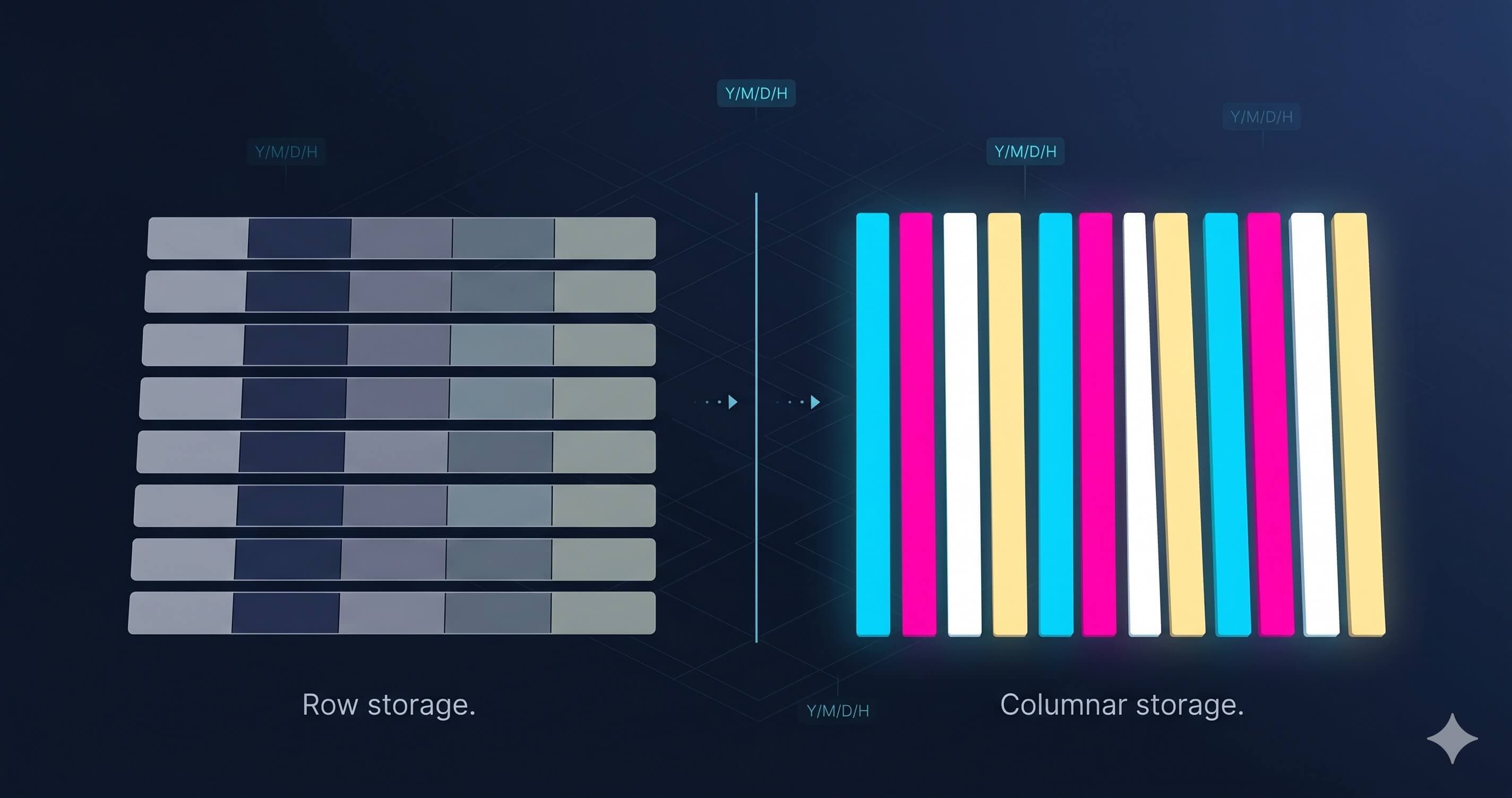
If you've ever waited four minutes for a dashboard to load, watched a SELECT COUNT(*) GROUP BY query crawl through millions of rows, or seen your cloud bill balloon because your analytical workload ran on a transactional database, you've already met the problem columnar databases solve.
This guide walks through what a columnar database actually is, why the format reshaped modern analytics, when to use one, when not to use one, and where the category is headed in 2026.
TL;DR
A columnar database is an analytical database that stores data column by column on disk instead of row by row, making it dramatically faster and more compressible for queries that aggregate, filter, or scan large datasets. It's the storage layout that powers most modern dashboards, observability platforms, and data warehouses.
Modern columnar databases like ClickHouse, DuckDB, BigQuery, Snowflake, and Arc are built around this insight. They power dashboards, observability platforms, time-series analytics, financial reporting, and AI feature pipelines.
If your queries scan many rows but touch few columns, a columnar database will outperform a row store by 10x to 100x. If your workload is row-at-a-time transactional reads and writes, stick with Postgres.
Row vs columnar: the actual difference
Imagine a simple table of sensor readings:
| timestamp | sensor_id | temperature | humidity | pressure |
|---|---|---|---|---|
| 2026-05-13 10:00:00 | sensor-1 | 22.4 | 45 | 1013 |
| 2026-05-13 10:00:01 | sensor-1 | 22.5 | 45 | 1013 |
| 2026-05-13 10:00:02 | sensor-2 | 19.8 | 52 | 1012 |
A row-oriented database stores this on disk roughly like:
[2026-05-13 10:00:00, sensor-1, 22.4, 45, 1013]
[2026-05-13 10:00:01, sensor-1, 22.5, 45, 1013]
[2026-05-13 10:00:02, sensor-2, 19.8, 52, 1012]
Each row sits together. To read one row, the database reads one contiguous chunk of bytes. Perfect for SELECT * FROM readings WHERE sensor_id = 'sensor-1' AND timestamp = '2026-05-13 10:00:00', because the row you want is in one place.
A columnar database stores the same data like this:
timestamps:   [2026-05-13 10:00:00, 2026-05-13 10:00:01, 2026-05-13 10:00:02]
sensor_ids:   [sensor-1, sensor-1, sensor-2]
temperatures: [22.4, 22.5, 19.8]
humidities:   [45, 45, 52]
pressures:    [1013, 1013, 1012]
Each column sits together. To compute AVG(temperature) over a billion rows, the database reads one contiguous stream of numbers, never touching the timestamp, sensor_id, humidity, or pressure columns.
This single change cascades into every advantage columnar databases have.
Why columnar databases are faster for analytics
1. You scan less data
Most analytical queries touch a small subset of columns. A query like:
SELECT date_trunc('hour', timestamp), AVG(temperature)
FROM sensor_readings
WHERE timestamp >= '2026-05-01'
GROUP BY 1
only needs two columns: timestamp and temperature. In a row store with 50 columns, you read 50x more data than you need just to walk the rows. A columnar engine reads exactly those two columns.
For wide tables (telemetry, observability, product analytics), this difference often translates to 10x to 50x less I/O.
2. Compression actually works
Columns of the same type compress far better than rows of mixed types. A column of sensor IDs is essentially a small dictionary repeated millions of times. A column of integer pressures clusters tightly around 1013. A column of timestamps increases monotonically.
Columnar engines exploit this with type-specific compression: dictionary encoding for low-cardinality strings, delta encoding for sorted integers, run-length encoding for repeated values, bit-packing for small ranges. ZSTD or Snappy then compresses the encoded result.
Typical compression ratios for analytical data:
- Row-oriented storage (Postgres, MySQL): 1.5x to 3x compression
- Columnar storage (Parquet, ClickHouse, Arc): 5x to 20x compression
Fewer stored bytes means less I/O, less network transfer, less RAM pressure, and a smaller cloud bill.
3. Vectorized execution lights up modern CPUs
When data is stored column-wise, a single CPU instruction can operate on thousands of values at once using SIMD (Single Instruction, Multiple Data). Modern columnar engines like DuckDB process data in batches of vectors, typically 1,024 or 2,048 values at a time, rather than one row at a time.
The result: CPU cycles spent computing, not moving data through pipeline stages. This is why a columnar engine on a single laptop can scan billions of rows per second. You can see it for yourself on the Arc Playground, where the same hardware running standard SQL returns multi-million-row aggregates in a few hundred milliseconds.
4. Aggregations and group-bys get cheap
Because the engine reads a column as a contiguous stream of typed values, aggregations like SUM, COUNT, AVG, MIN, MAX, and GROUP BY benefit from cache locality, vectorization, and compression all at once. The same query that takes 30 seconds on a row store can finish in 200 milliseconds on a columnar one.
A brief history of columnar storage
The idea isn't new. Sybase IQ shipped a columnar database in 1995. C-Store (the academic project that became Vertica) followed in 2005. But columnar didn't break into the mainstream until two things happened:
1. Hadoop and the data lake era (2008 to 2014). Tools like Hive, Impala, and Drill needed to query massive datasets cheaply. Columnar file formats, first ORC and then Apache Parquet, became the standard storage layer.
2. Cloud data warehouses (2015 to present). Amazon Redshift, Google BigQuery, Snowflake, and ClickHouse pushed columnar into the operational data stack. By 2020, every greenfield analytical database shipped columnar.
In parallel, two other developments reshaped the category:
- Apache Arrow (2016), an in-memory columnar standard that lets engines pass data to each other without serialization overhead. Now the lingua franca of analytics tooling.
- DuckDB (2019), which proved that a columnar engine can run embedded, on a laptop, with no cluster, and beat distributed systems on most real workloads. Reset expectations for what "small" analytics looks like.
By 2026, the dominant pattern is Parquet on object storage as the durable layer, plus a columnar query engine on top. Arc, DuckDB, ClickHouse, BigQuery, and Snowflake all converge on variations of this.
When to use a columnar database
A columnar database is the right choice when:
- You aggregate or scan many rows but touch few columns. Dashboards, reports, metrics, observability queries, BI tools.
- Your data is mostly append-only. Time-series, event streams, logs, telemetry, audit trails.
- You need fast filters across large date ranges. Anything time-bucketed: hourly rollups, daily summaries, retention analysis.
- Your queries are read-heavy. Analytics, ML feature pipelines, ad-hoc exploration.
- You need cheap storage at scale. Compression plus commodity object storage (S3, Azure Blob, GCS) makes terabyte-scale workloads economically viable.
- You care about schema flexibility. Most columnar engines support nested data, optional columns, and schema evolution without rewriting historical data.
When not to use a columnar database
Be honest with yourself. A columnar database is the wrong tool when:
- Your workload is heavy row-level updates. Updating one column in one row in a columnar store means rewriting (or carefully tombstoning) a much larger chunk. Postgres or MySQL handles this natively; columnar engines do it grudgingly or not at all.
- You need transactional guarantees. ACID transactions across many rows, foreign keys, complex multi-statement transactions: that's OLTP territory. Use a transactional database.
- Your application is read-one-row-at-a-time. Looking up a single user by ID, fetching a single order, returning one row to a web request. A row store with indexes wins here.
- Your dataset is small (under 1 GB) and your queries are simple. SQLite or Postgres will be perfectly fast and far easier to operate.
The common failure mode is treating a columnar database as a Postgres replacement. It isn't. The two solve different problems. Many production stacks run both: transactional state in Postgres, analytical workload in a columnar engine.
The 2026 columnar landscape
Today's columnar databases roughly split into four camps:
1. Cloud data warehouses. Snowflake, BigQuery, Redshift, Databricks SQL. Fully managed, pay-as-you-query, columnar storage abstracted away. Strongest at enterprise data warehousing and ELT pipelines. Weakest at cost predictability and latency under high concurrency.
2. Open-source analytical databases. ClickHouse, Apache Pinot, Apache Druid, Apache Doris. Self-hosted or managed offerings, optimized for real-time analytical workloads. Strongest at sub-second queries over recent data. Weakest at operational complexity (clusters, replicas, sharding).
3. Embedded columnar engines. DuckDB and Polars (DataFrame layer) ship inside Python notebooks, ETL jobs, and laptops. They routinely beat distributed warehouses on real workloads up to about a terabyte. Past that, you need a cluster, but most analytical problems aren't past that.
4. Time-series and observability-focused columnar. Arc, InfluxDB v3, QuestDB, TimescaleDB. Optimized for time-bucketed workloads: metrics, telemetry, logs. Strongest at high-throughput ingestion plus time-range queries. Differences mostly come down to storage portability, operational model, and how proprietary the engine is.
Why columnar storage portability matters in 2026
A point worth flagging in 2026: not all columnar databases store your data in a format you can read without them.
ClickHouse stores data in a proprietary internal format. So does Snowflake. InfluxDB v2 used the proprietary TSM format; v3 (IOx) switched to Parquet, which is part of why a v2-to-v3 migration is a rewrite, not a copy. If you decide to migrate away from any of these, or query the same data from a different tool, you're rewriting it.
A growing tier of modern columnar systems store data in open columnar file formats instead. Arc, DuckDB-on-Parquet, Apache Iceberg-backed engines, and lakehouse platforms all use Apache Parquet as the on-disk layer. The benefit: any tool that reads Parquet (which is most modern data tools) can query your data without ingestion. The cost: less room for clever proprietary optimizations.
If avoiding vendor lock-in matters to you, ask of any columnar database: where does my data physically live, and can I open it without you? We made the case for Parquet over proprietary formats in more detail elsewhere.
Columnar databases: key takeaways
A few load-bearing ideas:
- Columnar databases store columns together, not rows. That single change unlocks scan reduction, compression, vectorization, and cheap aggregations.
- They win at analytical workloads: aggregations over many rows, few columns at a time. They lose at transactional workloads: single-row reads, frequent updates, ACID guarantees across many rows.
- Parquet has become the default open columnar storage format. If a database stores its data as Parquet, you have portability. If not, you have lock-in.
- The right tool depends on workload shape. Cloud warehouses for enterprise BI, ClickHouse for real-time analytics, DuckDB for embedded, time-series-focused systems for telemetry and observability.
- Most production stacks now run both. Postgres for transactional state. A columnar engine for analytical workloads. The two are complements, not substitutes.
If you're evaluating columnar databases for a real workload, the questions worth asking aren't "which has the most features" but: what's the storage format? How does it handle ingestion? What does it cost to query at our scale? What happens when we want to leave?
Those are the answers that matter when the bill comes due.
Arc is the open-source columnar analytical database we build at Basekick Labs. It stores everything as native Parquet on S3, Azure, or local disk, and uses DuckDB as the query engine. If you want to see how a portable columnar database fits into your stack, try the playground, read the source, or come talk through the architecture with other practitioners.
basekick.netArc PlaygroundRun SQL on live demo datasets. Citibike, flights, vessels, satellites, weather. No signup./playground docs.basekick.netArc DocumentationInstallation, SQL reference, integration guides, and migration playbooks.https://docs.basekick.net github.comBasekick-Labs/arcOpen-source columnar analytical database. Parquet storage, DuckDB engine, sub-second queries.https://github.com/Basekick-Labs/arc